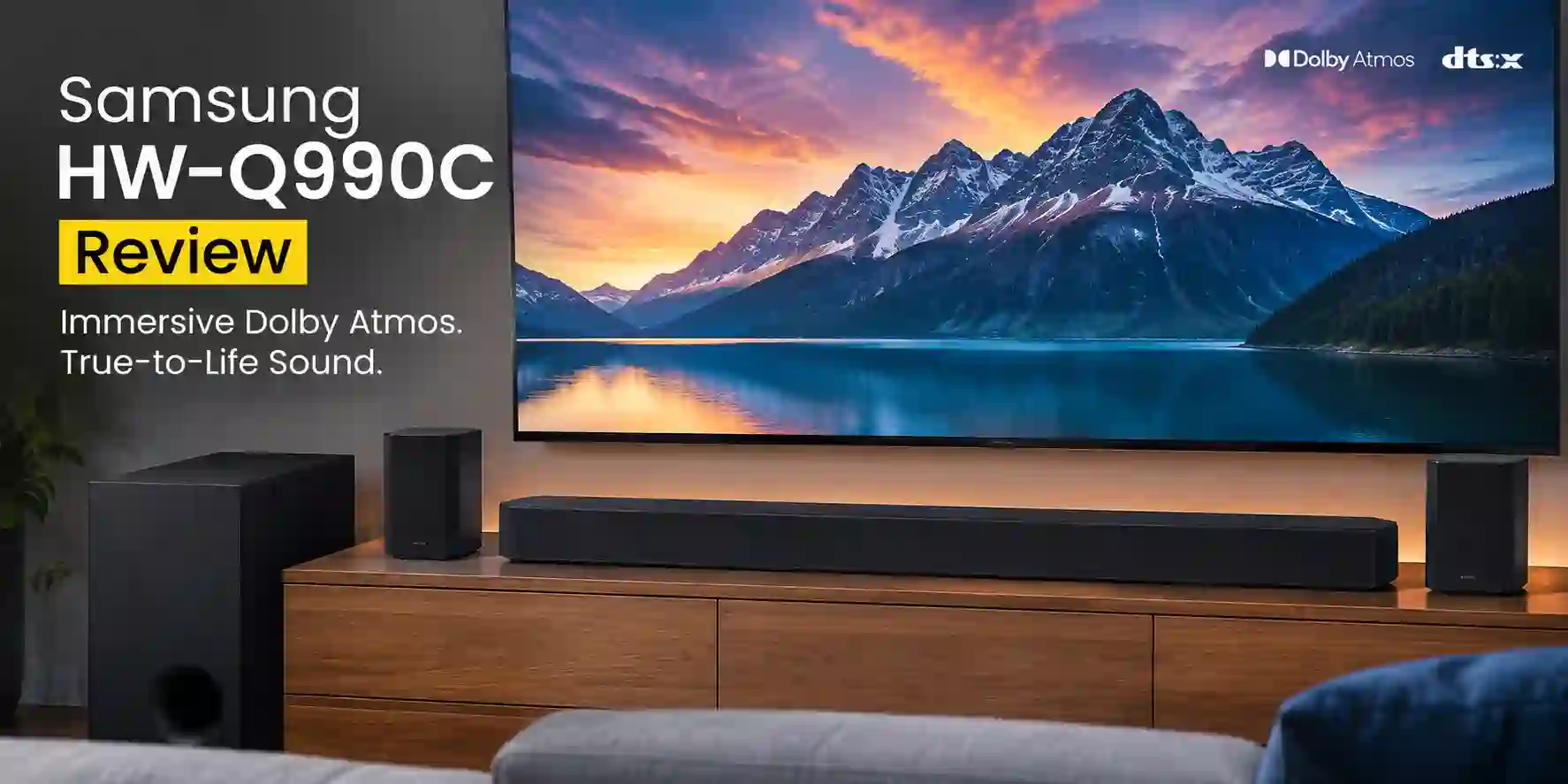
The Samsung HW-Q990C remains an excellent choice if you want a complete Dolby Atmos home theater system without buying a separate AV receiver and speakers. Its 11.1.4-channel setup, wireless rear speakers, dedicated subwoofer, and strong Atmos performance make it particularly well suited to movies and large-room viewing. However, it lacks HDMI 2.1 passthrough, and the Q990D/Q990F are newer alternatives for gamers and buyers who want the latest features.
Samsung HW-Q990C Pros & Cons
Pros
- Includes a wireless subwoofer and wireless rear speakers for a complete surround setup.
- Supports Dolby Atmos and Q-Symphony for immersive home theater audio.
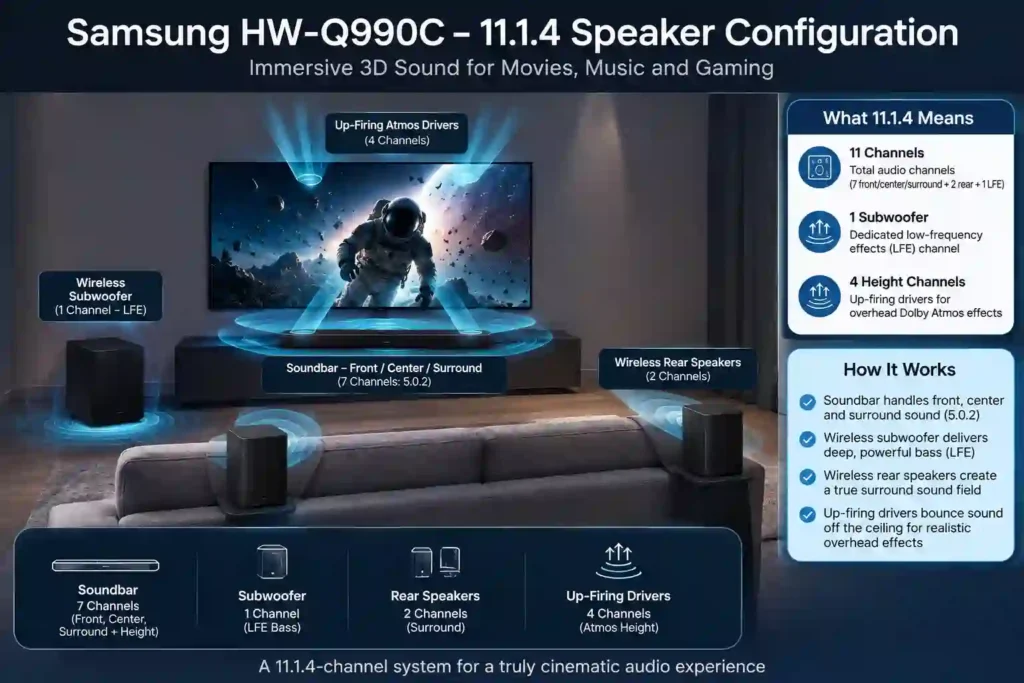
- Delivers 11.1.4-channel sound with dedicated up-firing channels.
- Includes useful features such as Adaptive Sound, SpaceFit Sound Pro, Game Mode Pro, AirPlay 2, and built-in Alexa.
- Can offer good value when available at a substantial discount.
Cons
- The HW-Q990C is a 2023 model and may be difficult to find from major retailers.
- Samsung’s U.S. website does not currently display a direct purchase price.
- Best Buy no longer lists the Q990C as available in new condition.
- Amazon listings may come from third-party sellers, and product condition may not always be clearly identified.
- If priced close to newer models, the Q990D or Q990F may be worth considering.
Samsung HW-Q990C Specifications
| Feature | Details |
| Model Name | Samsung HW-Q990C |
| Dimensions (Soundbar) | 48.5″ W x 5.4″ D x 2.7″ H / 1232 x 69.5 x 138.0 mm |
| Speaker Type | 11.1.4ch Dolby Atmos Soundbar with Wireless Subwoofer and Rear Speakers |
| Mounting Type | Tabletop, Wall Mount |
| Special Features | Wireless Dolby Atmos, DTS:X, Q-Symphony, SpaceFit Sound Pro, Adaptive Sound, Game Mode Pro, Night Mode, Active Voice Amplifier (AVA) |
| Recommended Use | Home Theater, Surround Sound, Music, TV, Gaming |
| Connectivity | 2x HDMI In, 1x HDMI Out (eARC), Optical In, Bluetooth, Wi-Fi, Chromecast, AirPlay 2, Spotify Connect |
| Control Methods | Remote, Voice Control (Alexa built-in; Google Assistant/Chromecast compatibility varies by region and configuration), SmartThings App, TV Remote via HDMI-CEC |
| Dimensions (Subwoofer) | 8.7″ W x 16.3″ H x 16.1″ D / 220 x 413 x 410 mm |
| Dimensions (Rear Speaker) | 5.1″ W x 7.9″ H x 5.5″ D / 129.5 x 201.3 x 140.4 mm |
| Weight (Soundbar) | 17 lbs / 7.7 kg |
| Weight (Subwoofer) | 25.8 lbs / 11.7 kg |
| Weight (Rear Speaker, each) | 7.5 lbs / 3.4 kg |
| Color | Black |
| Waterproof | No |
| Wireless Communication Technology | Bluetooth, Wi-Fi (802.11n, 2.4/5 GHz), AirPlay 2, Spotify Connect, Chromecast |
| Included Components | Soundbar, Wireless Subwoofer, 2 Wireless Rear Speakers, Remote Controller, HDMI Cable, Wall Mount Kit, Power Cords |
Specifications verified against Samsung’s product information. Features such as Chromecast and Google compatibility may vary by region. You can visit the Amazon Samsung HW-Q990C page to find more information.
How the Samsung HW-Q990C Fits Into Your Space

The Samsung HW-Q990C achieves high volume levels in medium to large rooms where space allows its multi-speaker system to breathe. Its design is solid yet compact enough to fit under most TVs or mount neatly on a wall. The subwoofer and rear speakers connect wirelessly, so you can place them somewhere out of the way without creating a mess in your entire environment.
For Movies
When playing a movie, the rear firing and side-firing speakers produce an engaging surround field. Dialogue comes through the dedicated center channel that uses the Active Voice Amplifier to automatically adjust voice levels during noisy sequences. The SpaceFit Sound Pro feature adjusts the performance to the size of the room and space in the furniture from corner to corner, allowing effects to remain consistent.
For Music
The Q990C is capable of very good music playback, particularly if you want strong bass and a spacious presentation. However, listeners who prefer a warmer or more neutral stereo presentation may prefer a dedicated stereo system or another soundbar. The soundbar performs well across genres from large orchestral tracks to pop tracks that emphasize bass. Wireless casting over Wi-Fi, AirPlay 2, and Spotify Connect performed seamlessly, allowing instant playback from any phone or smart device with no appreciable latency.
For Streaming
The Q990C’s configuration of 11.1.4 channels produces realistic effects of height and depth, thanks to support for Dolby Atmos and DTS:X audio formats. In rooms with regular ceilings, the up-firing drivers are able to reflect sound effectively as a means to reproduce overhead sound. While the extent of immersion will vary depending on room characteristics, most users describe the experience as engaging and ”like a theater.”
For TV and Daily Viewing
In everyday usage, the Q990C offers crisp dialogue and impressive clarity at lower volumes. If you would like to adjust the bass, treble, or surround levels, you can do so directly from the remote or Samsung’s SmartThings app. The app can also control mode switching and updates. It truly does come in handy for daily TV watching, with the option of voice control through Alexa or Google Assistant.
For Large & Open Spaces
The HW-Q990C is better suited to medium and large rooms than compact spaces because its dedicated rear speakers and wide soundstage need appropriate placement. In open-plan or high-ceiling rooms, Dolby Atmos height effects can be less predictable because reflected sound depends heavily on ceiling height, room geometry, and speaker placement.
Samsung HW-Q990C Customer reviews
| Amazon Samsung HW-Q990C Review Rating | 4.6 |
| Star | |
| 5 | 80% |
| 4 | 9% |
| 3 | 3% |
| 2 | 3% |
| 1 | 5% |
89% of review rate the Samsung HW-Q990C with 4 or 5 stars for its well-balanced surround sound, solid connection with Samsung TVs, and ease of setup. Others mention that the effects from the Dolby Atmos and DTS:X work well in medium and large rooms providing dialogue clarity and sound placement. Many review mentions the Q-Symphony feature, which allows the soundbar to use its output to play along with Samsung TVs to provide a fuller sound experience. Most users enjoy the SmartThings app to control and update the device, along with the overall solid and durable construction. A few mentions about the subwoofer not creating strong bass and the treble sounding brighter with certain music genres.
The remaining 11% of reviews that rate the Q990C 2 or 3 stars generally mention the uneven bass performance and the inability to customize music playback modes. Some users agree that the soundbar works great for movies, but not as much for casual or high-fidelity music listening. A small percentage of the reviews mentioned that the SmartThings app provides an inconsistent user experience and the instructions could be clearer. Others have mentioned problems with connectivity or delay with the rear speakers. Overall, these reviews tend to think that the Q990C has a better use for a home theater than for music and find it, overall, quite expensive.
| Top 3 Praises | Top 3 Complaints |
| Immersive Dolby Atmos and DTS:X surround sound | Weak or underpowered subwoofer |
| Easy setup and seamless Samsung TV integration (Q-Symphony) | Lacks warmth and depth for music playback |
| Clear dialogue and crisp, detailed audio quality | Limited setup instructions and occasional connectivity issues |
Top Competitor
Samsung HW-Q990C vs Q990D: What’s Different?
The Samsung Q990D is the newer model following the Q990C. Both use an 11.1.4-channel configuration, so the core speaker layout remains similar. The newer model focuses on updates to the overall experience, including refined sound tuning, app control, wireless performance, and compatibility with newer Samsung TVs.
For most listeners, the difference in sound quality may not be significant enough to justify paying substantially more for the newer model. If you can find the HW-Q990C at a considerably lower price, it remains an attractive option for buyers who want a complete Dolby Atmos home theater system.
The Q990D makes more sense if you specifically want the newer model and its updated features, while the Q990C is the better choice when your priority is getting strong home-theater performance at a lower price.
Samsung HW-Q990C vs Other Competitors
| Category | Samsung HW-Q990C | JBL Bar 1300 | Sonos Arc | JBL Bar 1000 | Sonos Arc Ultra Setup |
|---|---|---|---|---|---|
| Best For | Complete home theater | Movies, gaming & flexible surround | Simple & expandable setups | Affordable surround setup | Premium Sonos ecosystem |
| Overall Approach | Complete system | Complete surround system | Single soundbar with optional expansion | Complete surround system | Modular surround system |
| Rear Speakers | Wireless rear speakers included | Detachable wireless speakers | Not included | Detachable wireless rear speakers | Rear Era speakers added separately |
| Subwoofer | Wireless subwoofer included | Included | Not included; optional | Included | Sonos Sub added separately |
| Surround Setup | Complete out of the box | Flexible detachable-speaker setup | Requires additional components for full surround | Complete surround setup | Requires additional components |
| Dolby Atmos | Yes | Yes | Yes | Yes | Yes |
| DTS:X | Yes | Yes | — | Yes | — |
| Sound Character | Detailed, balanced & immersive | Bass-focused | Clear, detailed & spacious | Effective surround with strong bass | Deep lows, clear midrange & spatial audio |
| Bass Performance | Strong overall; some users report weaker-than-expected bass | Strong/bass-focused | Lower without optional subwoofer | Strong with included subwoofer | Stronger with Sonos Sub |
| Dialogue | Clear dialogue | Can sometimes be less clear with bass-heavy sound | Clear dialogue | Midrange/dialogue may be less precise | Clear midrange |
| Soundstage | Wide & immersive | Engaging surround field | Wide sound dispersion | Effective but narrower than Q990C/Bar 1300 | Detailed but less wide than Q990C in large rooms |
| Music | Good, although some users prefer it more for home theater | Bass-heavy; less refined with complex music | Strong choice for music & ecosystem use | Practical for general listening | Strong music & multi-room option |
| Movies | Excellent fit | Very good | Very good with expansion | Very good | Very good with full setup |
| Gaming | Strong home theater option | Strong bass-focused presentation | Good, but full surround requires expansion | Good surround option | Good with full setup |
| Connectivity / Streaming | Wi-Fi, Bluetooth, AirPlay 2, Chromecast, Spotify Connect | Wi-Fi, AirPlay 2, Chromecast, Alexa Multi-Room Music | AirPlay 2, app-based streaming & voice assistant integration | AirPlay, Chromecast & Bluetooth | App-based streaming, multi-room & smart-home integration |
| Room Suitability | Medium to large rooms | Multi-use spaces where flexible speaker placement is useful | Small to medium rooms | Smaller rooms / users wanting affordable surround | Small to medium rooms; flexible configurations |
| Setup | Complete system; SmartThings & SpaceFit Sound Pro | Straightforward; detachable speakers | Simple initial setup; expansion later | Straightforward | More involved because components are purchased separately |
| Expansion Approach | Complete system | Detachable wireless speakers | Modular Sonos ecosystem | Detachable wireless speakers | Modular Sonos ecosystem |
| Main Advantage | Complete immersive home theater in one package | Flexible speaker placement & bass-focused sound | Clean design & expandable ecosystem | More affordable surround alternative | Premium modular Sonos setup |
| Main Drawback | Larger system and higher price | Bass can affect dialogue/music refinement | No rear speakers or subwoofer included | Less powerful/narrower than Q990C | Additional components increase total cost |
| Best Alternative If… | You want an all-in-one home theater | You want flexible detachable speakers | You prefer Sonos & gradual expansion | You want a more affordable surround system | You want a premium modular Sonos system |
| Overall Verdict | Best for complete home theater | Best for flexible surround & bass | Best for simple expandable setup | Best for affordable surround | Best for premium Sonos ecosystem |
Setup & Ease of Use
The Samsung HW-Q990C includes the soundbar, wireless subwoofer, two wireless rear speakers, a remote, HDMI and power cables, and a wall-mount kit. Setup involves placing each unit near a power outlet, with the subwoofer and rear speakers connecting wirelessly to the bar. The soundbar has built-in mounting points and a bracket for installation under most TVs or on a wall.
The quick start guide explains how to connect the soundbar to a TV via HDMI eARC or Optical and verify the wireless links. The SmartThings app allows control of sound modes, levels, and system updates from a smartphone, and recommends optimal speaker placement. SpaceFit Sound Pro calibration adjusts audio to the room, including larger or irregular spaces.
For troubleshooting, pressing and holding the play/pause and volume buttons resets the soundbar, while unplugging and reconnecting individual speakers can restore wireless connections. The HW-Q990C setup provides clear instructions, app support, and stable wireless connectivity.
Troubleshooting & Common Issues
- Soundbar Not Turning On: Check that the power cords are firmly plugged into both the soundbar and the outlet. Use the included remote or the power button on the soundbar itself. Try a different power outlet if needed.
- No Sound or Audio Dropouts: Ensure the soundbar is properly connected to the TV via HDMI eARC or optical cable. Verify the correct input is selected on the soundbar. Wireless connections to the subwoofer and rear speakers can be checked by observing indicator lights; re-establish wireless pairing if lost.
- Remote Not Working: Replace batteries and ensure there are no obstructions between the remote and soundbar’s IR sensor. Users can also control the soundbar with the Samsung SmartThings app.
- Connectivity Problems with Wireless Speakers: If the subwoofer or rear speakers lose connection, power-cycle the units by unplugging for 10 seconds and then plugging back in. The soundbar can be reset via the reset method below to re-initiate pairing.
| Task | Steps | Notes / Tips |
| How to update Samsung HW-Q990C firmware | 1. Ensure soundbar is connected to Wi-Fi or compatible Samsung TV via HDMI eARC. 2. Open Samsung SmartThings app on your smartphone. 3. Go to Settings → Device Information → Firmware Update. 4. Download and install updates if available. 5. Soundbar will restart automatically after update. | Keeps performance smooth, adds new features, improves stability. |
| How to reset Samsung HW-Q990C | 1. Press and hold play/pause and volume down buttons on the soundbar for 5-7 seconds. 2. Wait as the soundbar powers off and restarts. 3. For subwoofer/rears: unplug them, wait 10 seconds, then plug back in. | Restores default settings and fixes common connection issues. |
| How to setup Samsung HW-Q990C | 1. Unbox components and place soundbar below or near TV. 2. Connect soundbar to TV via HDMI eARC (preferred) or optical cable. 3. Plug in subwoofer and rear speakers in power outlets; pairing is automatic. 4. Use remote or SmartThings app for basic control and SpaceFit Sound Pro calibration. | Fast setup (typically under 15 minutes). App ensures easy configuration and optimal audio. |
For more detailed guidance, you can visit the official support page of Samsung HW-Q990C.
Is the Samsung HW-Q990C Still Worth Buying?
The Samsung HW-Q990C offers advanced home theater sound with its 11.1.4 channel setup, including wireless rear speakers and a subwoofer. It delivers detailed dialogue through the Active Voice Amplifier and supports Dolby Atmos and DTS:X for surround effects, making it suitable for medium to large living rooms.
This model targets users seeking a high-end upgrade rather than a simple plug-and-play soundbar. Setup requires some effort, but the SmartThings app helps with calibration and control. Its size and wireless components may not fit well in smaller spaces.
For music, the HW-Q990C provides balanced tonal output and strong bass, suitable for a variety of genres. Users needing highly customizable equalizers or extreme audio control may prefer separate high-end components. The all-in-one system delivers advanced sound quality without the complexity of multi-component setups.
The HW-Q990C is a solid option for users who want surround sound with wireless flexibility and effective room coverage, provided they have the space and budget to accommodate it.
Final Conclusion
The Samsung HW-Q990C delivers precise audio with consistent surround effects and clear dialogue, particularly in medium to large living spaces. Its wireless rear speakers, subwoofer, and SmartThings app simplify setup and room calibration, while Dolby Atmos and DTS:X support enhance depth and positioning of sound. Some users may notice a slightly bright treble or moderate subwoofer output for music, but these are minor in comparison to its overall performance. For those seeking a high-end, integrated home theater solution without multiple components, the HW-Q990C provides reliable and well-balanced audio.
Research Methodology
This Samsung HW-Q990C review is based on secondary research rather than hands-on testing. We analyzed Samsung’s official specifications and support information, independent expert reviews, technical evaluations, and customer feedback to assess its sound quality, Dolby Atmos performance, connectivity, setup, features, and common issues. Customer opinions were treated as individual experiences, while performance conclusions were based on recurring findings across multiple sources. We did not personally test the HW-Q990C, so this article should be considered a research-based analysis rather than a first-hand hands-on review.
What type of audio content is the Samsung HW-Q990C soundbar best suited for?
The Samsung HW-Q990C is excellent for mixed usage, handling all sorts of audio content from music to movies to TV shows. It provides clear and detailed sound across the range, with thumpy low bass for action-packed scenes.
How does the Samsung HW-Q990C soundbar create an immersive sound experience?
This soundbar utilizes an 11.1.4 channel configuration with a discrete center channel, four up-firing drivers (two on the bar and two on the satellites), and two discrete satellite speakers. It also supports Dolby Atmos and DTS:X for immersive sound, with technologies like Q-Symphony that can integrate the soundbar’s speakers with compatible Samsung TV speakers.
What kind of sound customization options are available on the Samsung HW-Q990C?
The Samsung HW-Q990C comes with many sound customization features, including a SpaceFit Sound Pro room correction feature to optimize the sound based on your room’s acoustics. There’s also a 7-band graphic EQ in Standard mode and standard bass and treble adjustments in other sound modes.
What connectivity options does the Samsung HW-Q990C offer?
The soundbar includes two HDMI 2.0 inputs, an HDMI eARC output, digital optical, Bluetooth, and Wi-Fi. It also supports audio standards like Spotify Connect and Apple AirPlay 2. The HDMI ports allow for passthrough of devices like PCs and gaming consoles, but it does not support HDMI 2.1 or 4K/120Hz passthrough.
Does the Samsung HW-Q990C soundbar have voice assistant support?
Yes, the Samsung HW-Q990C has built-in Amazon Alexa for hands-free control. Google Assistant support may also be available depending on your region.
Is the Samsung HW-Q990C still worth buying in 2026?
Yes, if you find a complete unit at a clearly discounted price and do not need 4K/120Hz pass-through. It is less attractive at a high price because it is an older model, while the newer Q990D offers HDMI 2.1 features.
Is the Q990C better than the Q990D?
No. The Q990D is generally the better-equipped model, mainly because it supports HDMI 2.1 pass-through with 4K/120Hz. The Q990C may offer better value if you find it at a substantially lower price.
Does Q990C support 4K 120Hz?
No. The Samsung HW-Q990C supports 4K pass-through up to 60Hz but does not support 4K at 120Hz.
Does Q990C have HDMI 2.1?
No. The HW-Q990C supports 4K/60Hz pass-through rather than the HDMI 2.1 features available on the Q990D.
How big of a room is the Q990C good for?
Samsung does not specify a maximum room size for the HW-Q990C. It is best suited to a medium or large room where the rear speakers can be positioned behind or beside the seating area. Room layout, ceiling height, and speaker placement can affect the overall performance.
Does the Q990C need a Samsung TV?
No. You can connect the Q990C to compatible TVs from other brands through HDMI eARC/ARC or optical audio. However, a compatible Samsung TV is required for Samsung-specific features such as Q-Symphony.
Can I use the Q990C without the rear speakers?
Yes. The soundbar can be used without the wireless rear speakers, although you will not get the Q990C’s full surround-sound experience. The included rear speakers are required for the complete 11.1.4-channel setup.
Does the Q990C support DTS:X?
Yes. The Samsung HW-Q990C supports DTS:X as well as Dolby Atmos.