Finding the best sound setting for LG soundbar depends on your soundbar model. Its room setup and how you use it also affect the sound experience. Whether you’re watching movies, gaming, or just listening to music. However, some general tips and settings that can help you get the best sound experience. Let’s break them down in a simple and practical way.
The best LG soundbar settings for most users are AI Sound Pro or Movie Mode, Bass +4, Treble +1, Subwoofer +5, Rear Speakers +3, Side Speakers +2, HDMI eARC enabled, and Dolby Atmos turned on if your soundbar supports it. These settings provide the best balance for movies, TV, gaming, and music.
| Setting | Recommended |
| Sound Mode | AI Sound Pro |
| Movies | Movie Mode |
| Music | Standard |
| Gaming | Game |
| Dialogue | Clear Voice Pro |
| Bass | +4 |
| Treble | +1 |
| Subwoofer | +5 |
| Rear Speakers | +3 |
| Side Speakers | +2 |
| HDMI | eARC |
| TV Audio | Passthrough |
Choose the Right Sound Mode for LG Soundbars
Most LG soundbars offer multiple preset sound modes to suit different types of content. Find below the LG soundbar sound effects explained.
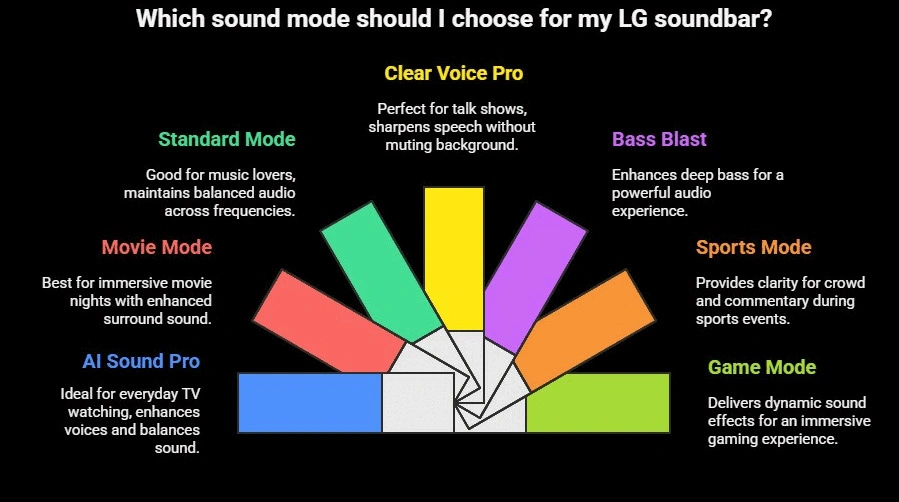
- AI Sound Pro: Ideal for everyday TV watching. It automatically adjusts audio based on what you’re watching. It enhances voices, balances sound, and makes everything clear.
- Movie Mode: Best for movie nights. It brings out the surround sound effects, making scenes feel immersive and dramatic.
- Standard Mode: Good for music lovers. It maintains a balanced audio across the lows, mids, and highs.
- Clear Voice Pro: Perfect for talk shows or dialogue-heavy content. It sharpens speech without muting the background.
- Other Modes: Bass Blast (for deep bass), Sports (for crowd and commentary clarity), and Game (for dynamic sound effects).
| Sound Mode | Best For | What It Does |
|---|---|---|
| AI Sound Pro Recommended | Everyday TV, Movies, Sports | Automatically analyzes the content and adjusts bass, dialogue, and surround effects for the best overall sound. |
| Cinema / Movie | Movies & OTT Streaming | Expands the soundstage, enhances surround effects, and creates a more cinematic experience. |
| Music | Songs & Concerts | Produces a balanced sound with natural vocals and instrument separation. |
| Game | Gaming (PS5, Xbox, PC) | Improves directional effects, footsteps, explosions, and in-game audio positioning. |
| Sports | Live Sports | Boosts commentary while making crowd noise and stadium atmosphere more immersive. |
| Clear Voice Pro | News, TV Shows & Dialogue | Enhances voices and speech clarity without making background audio overpowering. |
| Bass Blast / Bass Blast+ | Action Movies & EDM Music | Increases bass output and low-frequency impact for a more powerful listening experience. |
| Standard | Balanced Everyday Listening | Reproduces the original audio with minimal processing for a natural sound. |
| Night Mode (Available on selected models) | Late-Night Viewing | Reduces loud explosions and boosts dialogue so you can watch at lower volumes without disturbing others. |
Which Sound Modes Are Available on Your LG Soundbar?
| LG Soundbar Model | Available Sound Modes |
|---|---|
| LG SH5A | AI Sound Pro, Clear Voice Pro, Standard, Cinema, Music, Game, Sports, Bass Blast* |
| LG S95AR | AI Sound Pro, Standard, Cinema, Music, Sports, Game, Clear Voice Pro, Bass Blast+ |
| LG S30A | Basic Preset Modes (varies by region) |
| LG S40TR | Standard, Movie, Game |
| LG S65TR | Standard, Cinema, Music, Sports, Game, Clear Voice Pro, Bass Blast+, Night Mode |
| LG S70TY | AI Sound Pro, Standard, Music, Cinema, Sports, Game, Bass Blast+, Clear Voice Pro |
| LG S90TY | AI Sound Pro, Standard, Cinema, Music, Sports, Game, Clear Voice Pro, Bass Blast+ |
| LG S40T | Standard and Basic Preset Modes (varies by region) |
Available modes may vary slightly depending on the region and firmware version.
Adjust Bass and Treble Settings of LG Soundbars
Bass and treble settings can make a bigger difference than simply increasing the volume. The ideal settings depend on what you’re watching, the size of your room, and your LG soundbar model. The recommendations below are safe starting points that work well for most LG soundbars, including the SH5A, S30A, S40T, S40TR, S65TR, S70TY, S90TY, and S95AR.
Quick Recommendation: For most users, start with Bass: +2 and Treble: +1. This provides deeper bass while keeping dialogue clear. From there, adjust based on your room and personal preference.
Best Bass and Treble Settings for LG Soundbars
| What You’re Watching | Bass | Treble | Why These Settings Work |
|---|---|---|---|
| Movies | +2 to +4 | 0 to +1 | Adds punch to explosions and action scenes without overpowering dialogue. |
| Music | +1 to +3 | +1 to +2 | Produces fuller bass while keeping vocals and instruments balanced. |
| News & Dialogue | -1 to 0 | +2 to +4 | Reduces boomy bass and makes voices easier to understand. |
| Gaming | +2 to +3 | +1 | Improves explosions, footsteps, and directional sound effects. |
| Late-Night Viewing | -2 to -1 | +1 to +2 | Keeps dialogue clear while preventing bass from disturbing others. |
Recommended Settings by LG Soundbar Model
| LG Soundbar Model | Movies | Music | Dialogue | Late Night |
|---|---|---|---|---|
| LG SH5A | Bass +2 to +4 Treble 0 to +1 | Bass +1 to +3 Treble +1 to +2 | Bass -1 to 0 Treble +2 to +4 | Bass -2 to 0 Treble +1 to +2 |
| LG S30A | +1 to +2 / +1 to +2 | +1 / +1 to +2 | -1 to 0 / +2 to +4 | -2 to -1 / +1 to +2 |
| LG S40T | +1 to +2 / +1 | +1 / +1 | -1 to 0 / +2 to +3 | -2 / +1 to +2 |
| LG S40TR | +2 to +4 / 0 to +1 | +1 to +2 / +1 | -1 to 0 / +2 to +3 | -2 / +1 to +2 |
| LG S65TR | +2 to +4 / 0 to +1 | +1 to +3 / +1 to +2 | -1 to 0 / +2 to +3 | -2 to -1 / +1 to +2 |
| LG S70TY | +2 to +4 / 0 to +1 | +1 to +2 / +1 to +2 | -1 to 0 / +2 to +3 | -2 to -1 / +1 to +2 |
| LG S90TY | +1 to +3 / 0 to +1 | +1 to +2 / +1 to +2 | -1 to 0 / +2 to +3 | -2 to -1 / +1 to +2 |
| LG S95AR | +2 to +4 / 0 to +1 | +1 to +2 / +1 to +2 | -1 to 0 / +2 to +3 | -2 to -1 / +1 to +2 |
Note: These are recommended starting points. The ideal settings may vary depending on your room size, speaker placement, furniture, and personal listening preferences.
How to Fine-Tune Bass and Treble
If the recommended settings don’t sound perfect in your room, use these simple adjustments:
| Problem | What to Adjust |
|---|---|
| Dialogue sounds muffled | Lower Bass by 1–2 levels or increase Treble by 1 level. |
| Bass is too weak | Increase Bass or Subwoofer level by 1–2 steps. |
| Bass is too boomy | Lower Bass and move the subwoofer away from the corner. |
| Sound feels harsh | Reduce Treble by 1 level. |
| Movies lack impact | Increase Bass slightly and switch to Movie or Cinema Mode. |
| Music sounds flat | Increase both Bass and Treble by 1 level. |
Tips for Models with a Wireless Subwoofer
If your LG soundbar includes a dedicated subwoofer (such as the S70TY, S65TR, S90TY, or S95AR), adjusting the Subwoofer Level usually has a greater impact than increasing the Bass setting.
For most rooms:
- Subwoofer: +2 to +4
- Bass: +2
- Treble: +1
Avoid pushing both the Bass EQ and the Subwoofer level to their maximum values, as this can make dialogue sound muddy and reduce overall clarity.
Expert Tip
Don’t use maximum bass settings. Many users assume that higher bass always sounds better, but excessive bass often masks dialogue and reduces overall sound quality. Start with Bass +2 and adjust gradually until the audio feels balanced..
Tune Rear and Side Speakers of LG Soundbars
Not every LG soundbar includes rear or side speakers. If your model supports wireless rear speakers or an optional surround speaker kit, adjusting the speaker levels can make a noticeable difference to movies, gaming, and music.
The settings below are recommended starting points. You can fine-tune them based on your room size and personal preference.
Recommended Rear & Side Speaker Settings by LG Soundbar Model
| LG Soundbar Model | Recommended Use Case Settings | Notes |
|---|---|---|
| LG S95AR | Movies: Rear/Side +2 to +4, Center +1 to +2, Overhead +1 to +2, Subwoofer +2 to +4 Dialogue/News: Rear/Side 0 to +1, Center +2 to +4, Overhead 0 to +1, Subwoofer -1 to 0 Music: Rear/Side +1 to +2, Center 0 to +1, Subwoofer +1 to +2 Gaming: Rear/Side +2 to +3, Center +1 to +2, Subwoofer +1 to +3 | Full speaker-level adjustment available. Ideal for fine-tuning surround sound in dedicated home theaters. |
| LG S40TR | Movies: Rear +2 to +4 Dialogue/News: Rear 0 to +1 Music: Rear +1 to +2 Gaming: Rear +2 to +3 | Increase rear speakers for movies and games, but lower them for dialogue-heavy content to keep voices clear. |
| LG S65TR | Movies: Rear +2 to +4, Subwoofer +2 to +4 Dialogue/News: Rear 0 to +1, Subwoofer -1 to 0 Music: Rear +1 to +2 Subwoofer +1 to +2 Gaming: Rear +2 to +3, Subwoofer +1 to +2 | Delivers the best surround experience when rear speakers are balanced with the subwoofer. |
| LG S90TY | Movies: Side/Rear +2 to +3, Center +1 to +2, Subwoofer +2 to +4 Dialogue/News: Side/Rear 0 to +1, Center +2 to +4, Subwoofer -1 to 0 Music: Side/Rear +1 to +2, Center 0 to +1 Gaming: Side/Rear +2 to +3, Center +1 to +2 | Premium model with advanced channel controls. Avoid setting rear speakers too high in small rooms. |
| LG S70TY (with optional rear speakers) | Movies: Rear/Side +1 to +3, Subwoofer +2 to +3 Dialogue/News: Rear/Side 0 to +1, Subwoofer -1 to 0 Music: Rear/Side +1 to +2, Subwoofer +1 to +2 Gaming: Rear/Side +2 to +3, Subwoofer +1 to +2 | The base S70TY doesn’t include rear speakers. These settings apply only when optional compatible rear speakers are added. Focus on center-channel clarity for the best everyday experience. |
Tips for Getting the Best Surround Sound
- Movies: Increase the rear and side speaker levels to +2 to +4 for a more immersive surround sound experience.
- Dialogue & TV Shows: Keep rear speakers around 0 to +1 so voices remain clear and centered.
- Music: Use a mild rear speaker boost (+1 to +2) for a wider soundstage without affecting stereo imaging.
- Gaming: Set rear speakers to +2 to +3 to make footsteps, ambient sounds, and directional effects easier to hear.
Pro Tips
- Start with all surround speakers set to 0, then increase them gradually until the surround effect feels natural.
- If dialogue becomes difficult to hear, reduce the rear speaker level before adjusting the bass.
- In small rooms, avoid setting rear speakers above +3, as excessive surround volume can make the sound feel unnatural.
- If your model includes a wireless subwoofer, adjust its level separately instead of relying on rear speakers for more impact.
Room Calibration Matters
Room size, furniture placement, wall reflections, and speaker positioning all affect how your LG soundbar sounds. If your model supports AI Room Calibration or speaker tuning, taking a few minutes to calibrate it can noticeably improve dialogue clarity, surround effects, and bass balance.
Premium LG soundbars automatically analyze your room and optimize the audio, while entry-level models rely on manual tuning using bass, treble, and sound modes.
Room Calibration Support by LG Soundbar Model
| LG Soundbar Model | Room Calibration Support | How to Optimize Sound | Best For |
|---|---|---|---|
| LG SH5A | No AI Room Calibration | Manually adjust Bass, Treble, and use the appropriate Sound Mode. | Everyday TV, Movies, Music |
| LG S30A | Basic Manual Sound Tuning | Fine-tune Bass, Treble, Mid, and Subwoofer settings for your room. | Bedrooms & Small Rooms |
| LG S40T | Manual EQ Only | Use Bass/Treble controls and select the correct Sound Mode. | Everyday TV Viewing |
| LG S40TR | Speaker Level Tuning | Adjust Rear Speaker Levels and Sound Modes to balance surround effects. | Movies & Family Entertainment |
| LG S65TR | Speaker Balancing | Balance Rear Speakers, Center Channel, and Subwoofer for even surround sound. | Medium Rooms & Home Theater |
| LG S70TY | AI Room Calibration (Supported Models) | Run AI Room Calibration using the LG Sound Bar App or adjust speaker balance manually. | Dolby Atmos Movies & LG TVs |
| LG S90TY | Advanced Room Calibration | Fine-tune Center, Side, Rear, and Subwoofer levels for maximum immersion. | Premium Home Theater |
| LG S95AR | Full AI Room Calibration | Use AI Room Calibration and speaker-level adjustments for the most accurate surround sound. | Dedicated Home Theater Rooms |
How to Run AI Room Calibration
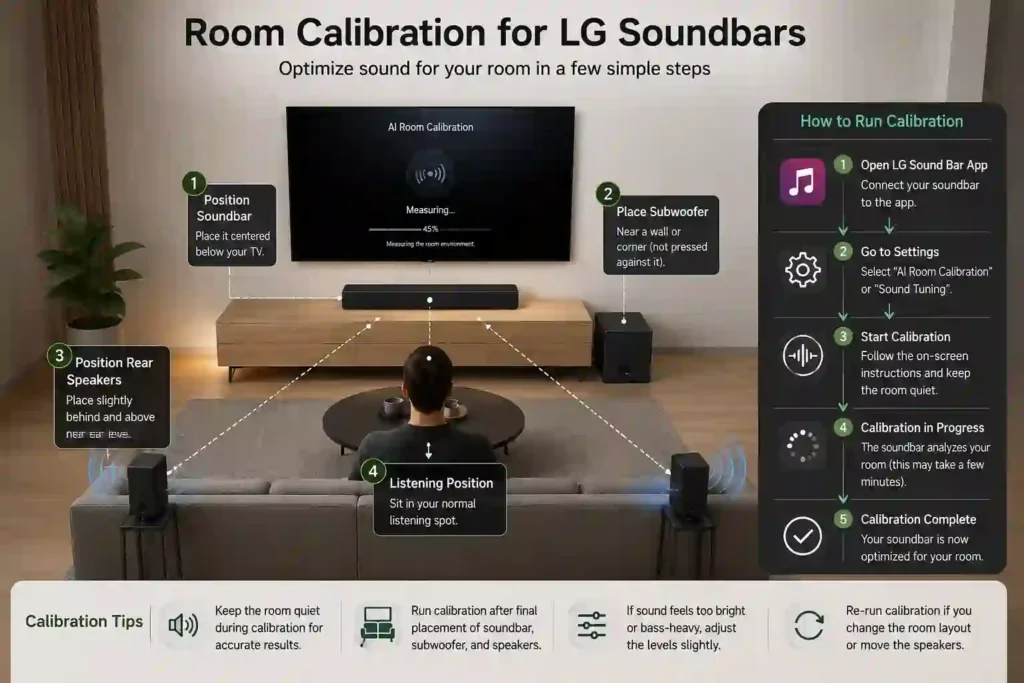
If your LG soundbar supports AI Room Calibration, follow these steps:
- Place the soundbar, subwoofer, and rear speakers in their final positions.
- Open the LG Sound Bar App (or use your soundbar’s on-screen menu if supported).
- Navigate to Settings → AI Room Calibration or Sound Tuning.
- Start the calibration process and keep the room as quiet as possible.
- Let the soundbar measure the room and automatically optimize the speaker output.
Tip: If the calibrated sound feels too bright or too bass-heavy, make small adjustments to the bass or subwoofer level instead of disabling calibration completely.
Recommended Calibration by Use Case
| Use Case | Calibration Goal |
|---|---|
| Movies | Slightly increase rear/side speaker levels, keep dialogue clear, and avoid excessive bass. |
| Dialogue & News | Prioritize the center channel and slightly reduce the subwoofer for clearer voices. |
| Music | Keep EQ changes subtle to preserve balanced vocals and instruments. |
| Gaming | Increase surround speaker levels slightly for better directional effects and immersion. |
| Late-Night Viewing | Reduce subwoofer and surround speaker levels while keeping dialogue clear. |
Placement Tips for Better Sound
Even the best soundbar settings won’t perform well if the speakers are placed incorrectly.
- Position the subwoofer near a wall or corner, but leave 15–30 cm (6–12 inches) of space to avoid boomy bass.
- Place rear speakers slightly behind your seating position at ear level for the best surround effect.
- Avoid placing the soundbar inside enclosed TV cabinets, as this can block sound dispersion.
- Use HDMI eARC whenever available for the highest-quality Dolby Atmos and DTS:X audio.
- Set your TV’s digital audio output to Auto or Pass Through to preserve surround sound formats.
Which LG Soundbars Benefit Most from Room Calibration?
Room calibration has the biggest impact on premium surround sound systems because they use multiple speakers and advanced audio processing.
Best models for AI Room Calibration:
- LG S95AR
- LG S90TY
- LG S70TY
- LG S65TR
For entry-level models like the SH5A, S30A, and S40T, you’ll usually get better results by choosing the correct Sound Mode and manually adjusting the Bass and Treble settings instead of relying on automatic calibration.
Check out how to set up LG S70TY soundbar step by step here.
Best Sound Setting for LG Soundbar at a Glance
Getting the best sound from your LG soundbar isn’t about using the highest bass or loudest settings—it’s about choosing the right sound mode and making small adjustments based on your room and the content you’re watching. Start with AI Sound Pro for everyday use, switch to Movie Mode for films, and fine-tune the bass, treble, and speaker levels to match your listening preferences. With the right setup, you can enjoy clearer dialogue, deeper bass, and a more immersive home theater experience.