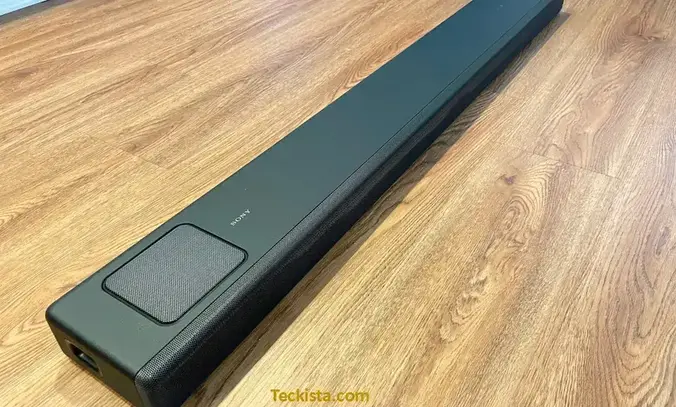
The Sony HT-A5000 soundbar is a 5.1.2-channel system made for people who want rich and clear Dolby Atmos and DTS:X sound at home. It uses Sony’s 360 Spatial Sound Mapping and Vertical Surround Engine to create a wide and detailed audio experience for movies, music, and gaming. This Sony HT-A5000 review is based on official specifications, user reviews, and expert analysis to show how the HT-A5000 performs in real use. If you’re upgrading your TV sound or want a powerful soundbar without adding many speakers, this guide gives you a simple, fact-based look at what the Sony HT-A5000 does well and where it could improve.
Sony HT-A5000 Specifications
| Feature | Details – Sony HT-A5000 Soundbar |
| Model Name | Sony HT-A5000 |
| Dimensions (Soundbar) | 47.6″ W x 2.6″ H x 5.5″ D / 1210 x 67 x 140 mm |
| Speaker Type | 5.1.2ch Dolby Atmos Soundbar with up-firing, side beam, and built-in dual subwoofers |
| Mounting Type | Tabletop, Wall Mount (Wall mount bracket included) |
| Special Features | Dolby Atmos, DTS:X, 360 Spatial Sound Mapping, Vertical Surround Engine, S-Force PRO Front Surround, Sound Field Optimization, Voice Mode, Night Mode, BRAVIA Acoustic Center Sync |
| Recommended Use | Home Theater, Movies, Music, Gaming, Dialogue Clarity |
| Connectivity | HDMI eARC/ARC (1 input / 1 output), Optical Audio, USB-A, Wi-Fi (802.11 a/b/g/n/ac, 2.4/5 GHz), Bluetooth 5.0, Ethernet |
| Control Methods | Remote Control, Sony Music Center App (iOS/Android), TV Remote via HDMI-CEC, Alexa & Google Assistant compatibility |
| Dimensions (Subwoofer) | Not included (Optional SA-SW3 or SA-SW5) |
| Dimensions (Rear Speaker) | Not included (Optional SA-RS3S or SA-RS5) |
| Weight (Soundbar) | 13.5 lbs / 6.1 kg |
| Color | Black (Matte finish, Omnidirectional Block design) |
| Waterproof | No |
| Wireless Communication Tech | Wi-Fi (802.11 a/b/g/n/ac), Bluetooth 5.0, Apple AirPlay 2, Chromecast built-in, Spotify Connect |
| Included Components | Soundbar, Remote Control, HDMI Cable, Power Cord, Wall Mount Bracket, Quick Start Guide |
The key specifications are outlined above. For comprehensive technical details, refer to the official Sony HT-A5000 listing on Amazon.
How the Sony HT-A5000 Fits Into Your Space
The Sony HT-A5000 soundbar combines clean design with strong performance, making it suitable for medium to large rooms. Its slim, minimalist build fits neatly under most 55-inch or larger TVs and matches well with modern interiors. The matte finish and soft edges give it a balanced look whether placed on a stand or mounted on the wall. For users who want a fuller sound, it can connect wirelessly to the SA-SW3 or SA-SW5 subwoofers and SA-RS3S rear speakers, offering easy expansion without visible cables.

For Movies
With Dolby Atmos and DTS:X support, the HT-A5000 uses up-firing, side-firing, and front speakers to project sound in multiple directions, creating a layered audio field. Sony’s Vertical Surround Engine and S-Force PRO Front Surround reproduce height and surround effects even without rear speakers. The dedicated center channel keeps dialogue clear, while 360 Spatial Sound Mapping (when used with compatible rear units) improves sound placement, making subtle and dynamic moments equally detailed.
For Music
The HT-A5000 also works well as a high-quality music system. It supports high-resolution and 360 Reality Audio formats, delivering clear sound with good depth and separation between instruments. Built-in streaming options such as Bluetooth, Chromecast, Spotify Connect, and Apple AirPlay 2 make it easy to play music from a phone or online service. Vocals sound natural and detailed, and when paired with a subwoofer, the bass adds a smooth and balanced tone that suits pop, jazz, and orchestral music.
For Streaming Content
When streaming content from Netflix, Prime Video, or Disney Plus, the HT-A5000 delivers clear and consistent audio. Its 5.1.2-channel setup adds depth to dialogue and background effects, creating a realistic sense of space. Sound reflections from the ceiling and walls enhance the surround effect, though room size and surface materials can slightly change the outcome. In most living rooms, users find the sound immersive and well-balanced, making it suitable for long viewing sessions..
For TV and Daily Viewing
During regular TV watching or sports, the HT-A5000 produces clear dialogue and steady sound levels using its Sound Field Optimization feature, which adjusts audio automatically based on the room. Voice control works smoothly with Google Assistant, Amazon Alexa, and Chromecast-enabled devices. The Sony Music Center app also provides options to adjust the equalizer and sound modes manually. Night Mode and Voice Mode help maintain clarity at lower volumes, making the soundbar practical for late-night or everyday use.
For Large & Open Spaces
The HT-A5000 delivers 450 watts of power and broad sound coverage, filling large and open spaces evenly. In loft-style or high-ceiling rooms, it maintains clear highs and strong lows across the spectrum. When connected to Sony rear speakers, the 360 Spatial Sound automatically adjusts to the room, creating a precise surround effect suitable for home theaters and spacious layouts.
Amazon Sony HT A5000 Soundbar Reviews Rating
| Amazon Sony HT-A5000 Soundbar Review Rating | 4/5 |
| Stars | |
| 5 Star | 61% |
| 4 Star | 11% |
| 3 Star | 7% |
| 2 Star | 7% |
| 1 Star | 14% |
Customers who rate the Sony HT-A5000 soundbar four or five stars highlight its clear, high-quality sound and strong Dolby Atmos performance. Many reviewers find it simple to set up and appreciate its straightforward plug-and-play design. The sound clarity and depth when watching movies or streaming music are frequently mentioned as key strengths. Users also value its wireless design, the ability to expand with optional subwoofers or rear speakers, and compatibility with smart devices such as Chromecast and Roku. Even buyers of pre-owned units report that it performs like new and is worth the price. While some note limited options for customizing sound, these issues do not outweigh the overall performance, making it a well-regarded choice for home audio.
Customers who rated the Sony HT-A5000 soundbar below three stars often mention frustration with limited sound customization and issues when connecting to Sony TVs or gaming consoles. Some users report weak dialogue clarity, particularly during TV shows or documentaries, making the soundbar better suited for action movies. The lack of a proper equalizer and few sound adjustment options make it difficult to fine-tune the audio. Several reviewers note connectivity problems with devices like the PS5 or Bravia TVs, causing power resets and inconsistent switching between TV speakers and the soundbar. Others feel the default sound is overly focused on midrange frequencies, producing a flat or unnatural tone. While the build quality is solid, many users are disappointed by the software limitations and user experience, especially given the high price.
| Praises | Complaints |
| Outstanding Dolby Atmos sound quality with rich, immersive audio. | Weak dialogue clarity in regular TV or documentary content. |
| Premium build and sleek design that feels durable and high-end. | Limited EQ and customization options for sound adjustment. |
| Easy to set up with strong wireless connectivity and streaming support. | Connectivity and sync issues with Sony TVs and PS5, requiring frequent resets. |
Top Competitor
Sony HT-A5000 vs HT-A7000
The Sony HT-A7000 offers a 7.1.2 channel setup compared to the HT-A5000’s 5.1.2, providing a more detailed and expansive soundstage. It has two HDMI inputs instead of one, higher build quality, and supports dual subwoofers and rear speaker connections for a fuller surround experience. The HT-A5000, however, can achieve slightly higher volume with less compression, making it a strong option for smaller rooms. The A7000 suits home theaters that require maximum surround sound, while the A5000 delivers good performance and flexibility for medium-sized spaces at a lower cost. The A7000’s added features come with a higher price, making the HT-A5000 a practical choice for budget-conscious buyers.
Sony HT-A5000 vs Bravia 8 (Sony Bravia models with built-in soundbar)
The HT-A5000 soundbar delivers better audio performance than Bravia’s built-in speakers, thanks to dedicated drivers and support for Dolby Atmos and DTS:X. Bravia’s integrated speakers have limited power and spatial range, producing sound that is adequate but less immersive and mainly focused on TV content. The HT-A5000 offers greater depth, clarity, and a wider soundstage, making it more suitable for movies and music. The tradeoff is the additional hardware and space required for the standalone soundbar, whereas the Bravia 8 is more compact but sacrifices audio richness and surround effects. For users who want more detailed and expansive sound than typical TV speakers, the HT-A5000 is the better choice.
Sony HT-A5000 vs Sonos Arc
The Sonos Arc provides a refined user experience with multi-room control, smart assistant integration, and automatic room tuning using Trueplay. It delivers a wide and tall soundstage and fits well within the Sonos ecosystem. In comparison, the Sony HT-A5000 integrates closely with Sony TVs and features enhanced 360 Spatial Sound Mapping, which improves surround effects when paired with optional rear speakers. Its up-firing and side-firing drivers create precise sound placement for some listeners. While the Arc offers smoother music streaming and app control, the HT-A5000 can produce higher volume with less distortion. Both are high-end soundbars, with the Arc appealing more to music enthusiasts and the HT-A5000 suited for users focused on movies and immersive TV setups.
Sony HT-A5000 vs HT-A3000
The HT-A3000 is an entry-level Dolby Atmos soundbar with a 3.1.2-channel setup, making it more budget-friendly compared to the HT-A5000’s 5.1.2 configuration. While the A3000 delivers acceptable spatial audio and supports key features like Dolby Atmos, the A5000 provides higher output, stronger surround effects, and clearer dialogue and bass. The HT-A5000 also allows connection to optional wireless subwoofers and rear speakers for a more complete home theater experience. The A3000 works well for smaller rooms or casual viewers who want immersive sound without additional components, whereas the A5000 is better suited for larger spaces and users seeking more detailed audio performance.
Sony HT-A5000 vs Bose 900
The Bose Smart Soundbar 900 features a refined design and enhanced dialogue clarity using Bose’s ADAPTiQ audio calibration system. It works seamlessly within the Bose ecosystem and supports voice assistants directly. The soundbar delivers a wide, detailed soundstage with clear vocals, though its bass is less prominent without a subwoofer. The Sony HT-A5000 offers higher output at 450 watts and uses spatial sound mapping to create a more immersive surround experience. It integrates smoothly with Sony TVs and emphasizes dynamic sound effects in movies, while the Bose provides a more even sound suitable for music. Overall, the Bose excels in user interface and calibration, while the Sony focuses on power and spatial immersion.
Sony HT-A5000 vs HT-SC40
The Sony HT-SC40 is an entry-level soundbar without support for Dolby Atmos or advanced surround formats, while the HT-A5000 is a 5.1.2 Dolby Atmos system with premium features. The HT-SC40 provides a simple and affordable improvement over standard TV speakers, suitable for casual viewing but limited in height effects and bass performance. The HT-A5000 delivers a more immersive audio experience with multi-dimensional surround sound, higher output, and additional features such as spatial sound mapping and voice control. The tradeoff is a higher price and larger size for the A5000. Users seeking advanced sound quality and modern features will prefer the HT-A5000, while the SC40 remains a practical choice for those with a tighter budget.
Pricing analysis
| Parameter | Sony.com | Amazon | Best Buy | Walmart |
| Avg Price | $999.99 | $778–$899 | $899.99 | $449.99–$899.99 |
| High Price | $999.99 | $899 | $899.99 | $899.99 |
| Low Price | $999.99 | $778 | $899.99 | $449.99 (open box/refurb) |
| What will you get? | Standard bundle: soundbar, remote, HDMI cable, power cord, optical cable, setup guide | Standard bundle, often includes return options, some sellers offer extended warranty | Standard bundle, curbside or in-store pickup, Geek Squad protection available | Standard bundle, additional Epic Protect warranty (1–4 yrs), free shipping/returns available |
| Warranty | 1-year manufacturer’s warranty | 1-year manufacturer, extended plans with select sellers | 1-year manufacturer, Geek Squad options | 1-year manufacturer, extended Epic Protect options available |
Pricing information excludes temporary discounts or promotional offers. For the latest deals and current pricing, please check each retailer’s official website.
Setup & Ease of Use
The Sony HT-A5000 comes with the soundbar, remote control, batteries, AC power cord, HDMI cable, wall mounting brackets, screws, TV center speaker cable, user manual, and startup guide. You can place the soundbar on a shelf in front of the TV or mount it on the wall using the included template and hardware. Connecting it to a TV is simple via the HDMI eARC or ARC port for Dolby Atmos support, with an optical input available for TVs without HDMI ARC. The on-screen Easy Setup menu guides you through configuring speaker and network settings step by step.
Sound Field Optimization automatically adjusts audio for your room using built-in microphones, and you can fine-tune speaker distance and levels manually. Pairing optional wireless subwoofers or rear speakers is straightforward using the setup guide and on-screen instructions. The soundbar also supports control through the Sony app and voice assistants like Google Assistant, Alexa, and Chromecast. Most users find the setup process clear and well-supported, making the HT-A5000 convenient to use in any home theater arrangement.
Troubleshooting & Common Issues
Common Troubleshooting Issues & Quick Fixes
| Issue | Possible Cause | Quick Fix |
| No Power / Freezes | Power cable loosely connected or power surge | Ensure the power cord is securely plugged into both the AC outlet and soundbar. Unplug for 60 seconds, then reconnect. If the display remains unresponsive, perform a factory reset by holding Power + Volume Down for 5 seconds. |
| No Sound or Low Volume | Incorrect input source or TV HDMI ARC not active | Verify that the HDMI cable is connected to the TV’s eARC/ARC port. Set TV sound output to HDMI or eARC. Run Sound Field Optimization under sound settings. |
| Subwoofer / Rear Speakers Not Connecting | Wireless link interrupted or mismatch | Press the Secure Link button on the subwoofer/rears and select “Start” on the soundbar remote via Home → Setup → Wireless Speaker Settings → Secure Link. Avoid placing Wi‑Fi routers too close. |
| Bluetooth Pairing Fails | Multiple pairings or interference | Delete old pairings on connected devices, then hold Bluetooth on the remote for 5 seconds to enter pairing mode. Ensure the soundbar is visible in Bluetooth settings. |
| Sound Skipping or Noise | Signal interference or outdated firmware | Move the soundbar away from metal objects or routers. Check System → Software Update → Update via Internet for firmware updates to stabilize connections. |
| No Dolby Atmos Output | Incompatible TV port or incorrect audio setting | Confirm the TV supports Dolby Atmos via HDMI eARC. On your TV, enable eARC Mode: Auto and Pass‑Through: On. Select a true Dolby Atmos source (e.g., Netflix, Disney+). |
| Remote Control Not Working | Battery drained or blocked IR sensor | Replace batteries and remove obstacles between remote and soundbar. For app-based control, verify that the soundbar and phone share the same Wi‑Fi network. |
| Display Stuck on “HELLO” Loop | Firmware glitch during update | Power off, disconnect AC cord for one minute, reconnect, and retry. If issue persists, contact Sony Service for firmware restoration |
| Task | Steps |
| How do I connect the HT-A5000 to my TV? | Connect the soundbar’s HDMI OUT (eARC/ARC) port to the TV’s HDMI eARC or ARC port with a High Speed HDMI cable. If the TV lacks eARC, use the optical cable for audio output. Make sure TV sound output settings are set to HDMI eARC or ARC. |
| Can I use the HT-A5000 without a Sony TV? | Yes, it works with any TV that supports HDMI ARC or eARC. Pairing with a Sony BRAVIA TV unlocks additional features such as Acoustic Center Sync and remote control via TV remote. |
| How do I add a subwoofer or rear speakers? | Use the Wireless Speaker Settings on the soundbar’s setup menu to pair compatible Sony subwoofers (SA-SW3/SA-SW5) and rear speakers (SA-RS3S/SA-RS5). Follow on-screen pairing instructions to complete setup. |
| Can the HT-A5000 play Dolby Atmos content? | Yes, connect via HDMI eARC to a compatible TV and play Atmos-enabled content through supported streaming apps or Blu-ray discs. |
| Does the HT-A5000 need rear speakers for surround sound? | No, it can create virtual surround sound using up-firing and side-firing drivers through Vertical Surround Engine and S-Force PRO Front Surround technology. Rear speakers improve immersion but are optional. |
| How do I enable voice control? | Enable Google Assistant, Amazon Alexa, or Apple AirPlay 2 through the corresponding app on your smartphone. The soundbar works with these assistants via your home Wi-Fi network. |
| What types of audio formats are supported? | Supports Dolby Atmos, DTS:X, LPCM, Dolby TrueHD, and High-Resolution Audio. Also supports 360 Reality Audio for compatible streaming services. |
| How can I update the firmware? | On the soundbar, navigate to Home → Setup → System → Software Update → Update via Internet. Regular updates ensure compatibility with streaming apps and features. |
| Can it connect to Bluetooth headphones or multiple devices? | No, it receives Bluetooth audio from devices like phones or tablets; it does not transmit audio to Bluetooth headphones or support multipoint Bluetooth output. |
| Why doesn’t my soundbar produce sound from the rear channels? | Rear channels only activate with surround sound content (5.1, Atmos). Ensure your source outputs surround sound and optional rear speakers are properly linked through the Wireless Speaker Settings menu. |
For more detailed guidance, you can download the Sony HT-A5000 user manual.
Final Conclusion
The Sony HT-A5000 is a well-built soundbar that delivers clear, spacious audio and strong Dolby Atmos performance even without additional speakers. It supports wireless expansion, voice control, and integrates smoothly with Sony BRAVIA TVs, offering a practical balance of power and usability. Some users have noted limited sound customization and occasional connectivity issues, but the overall audio quality and immersive performance make it a solid choice within its price range. For those looking for reliable sound, modern connectivity, and a clean design, the Sony HT-A5000 provides consistent performance and flexibility for a home theatre setup.
What are the key features of the Sony HT-A5000?
The Sony HT-A5000 is a 5.1.2 channel soundbar that supports Dolby Atmos and DTS:X, featuring upward-firing speakers for immersive audio. It includes built-in subwoofers and offers Bluetooth connectivity for streaming music
Is the setup process complicated?
While the setup can seem detailed, most users find it straightforward, taking around 15 minutes to connect and configure using the included HDMI cable and user-friendly interface
Can I connect wireless speakers or a subwoofer?
Yes, the HT-A5000 allows for optional wireless surround speakers and a separate wireless subwoofer, enhancing the overall audio experience if desired
Does it have any sound customization options?
The HT-A5000 includes Sound Field Optimization technology to enhance audio based on your room’s acoustics, but it has limited sound customization features overall