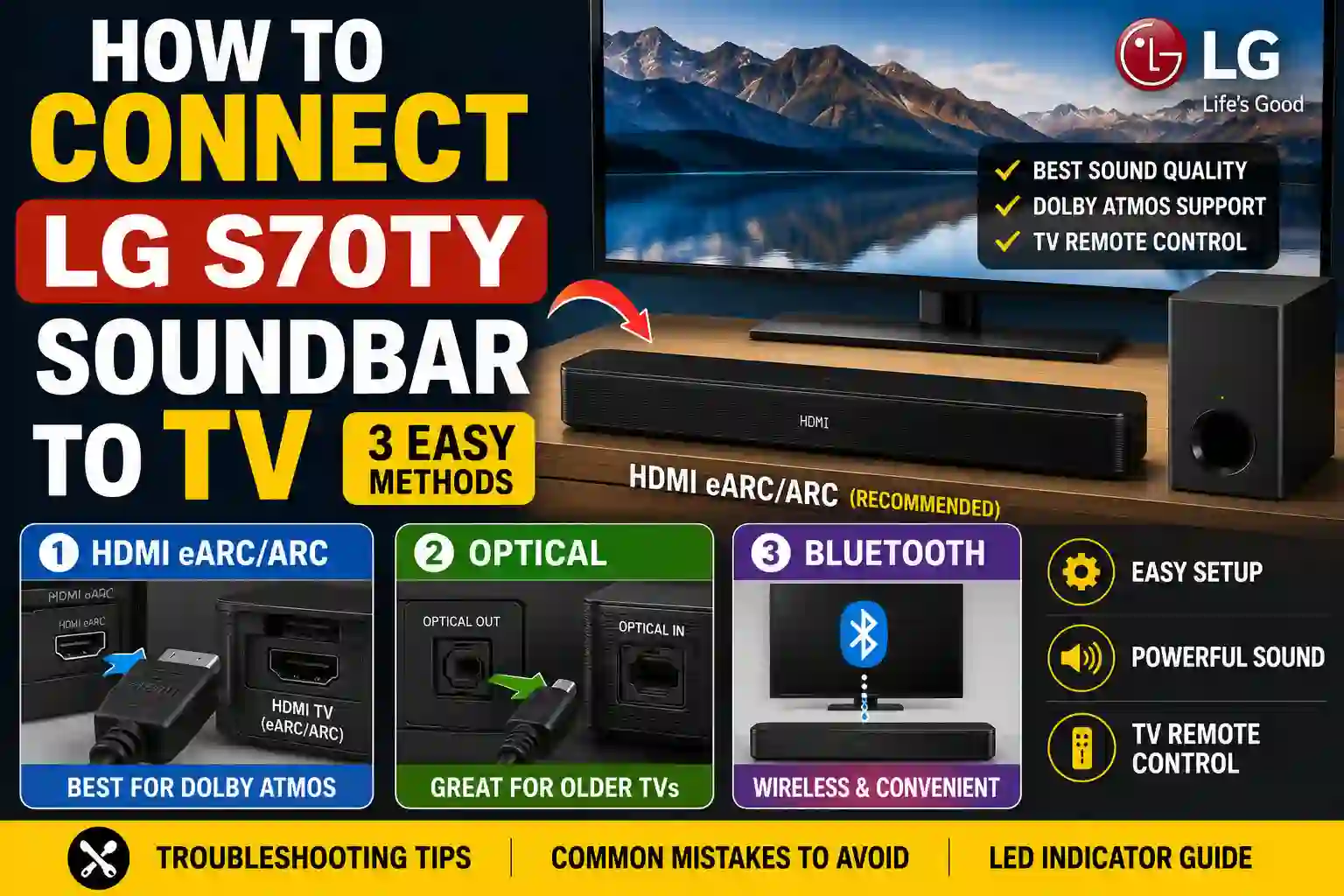
Need to know how to connect LG S70TY soundbar to TV? The fastest and best method is HDMI eARC/ARC, which provides the highest sound quality, supports Dolby Atmos, and lets you control the soundbar with your TV remote. If your TV doesn’t support HDMI ARC, you can also use an optical cable or Bluetooth. This step-by-step guide covers all three methods, common connection problems, and quick fixes.
LG S70TY Connection Methods at a Glance
Here’s a more SEO-friendly and search-intent-focused version that is easier to scan and more likely to earn a Featured Snippet.
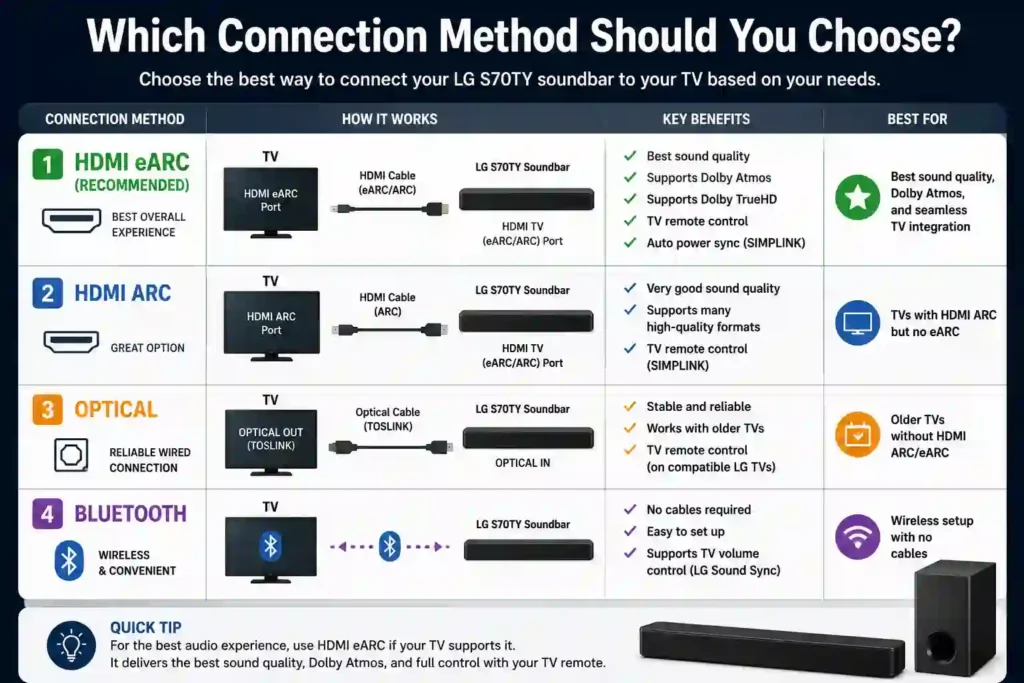
| Connection Method | Sound Quality | Dolby Atmos | TV Remote Control | Best For |
|---|---|---|---|---|
| HDMI eARC (Recommended) | Excellent | Yes | Yes | Best overall sound quality, Dolby Atmos, and seamless TV integration |
| HDMI ARC | Very Good | Limited | Yes | TVs with HDMI ARC but no eARC |
| Optical Cable | Very Good | No | Yes (compatible LG TVs) | Older TVs without HDMI ARC/eARC |
| Bluetooth | Good | No | Yes (LG Sound Sync compatible TVs) | Wireless setup with no cables |
What You’ll Need
- LG S70TY soundbar with its included wireless subwoofer
- LG TV with HDMI ARC or eARC port, optical out, or Bluetooth support
- High-speed HDMI cable (for HDMI ARC/eARC setup)
- Optical (TOSLINK) cable (for optical connection option)
- Access to LG TV settings menu and soundbar Function/Input selection
- LG TV remote and LG S70TY soundbar remote
- Nearby power outlets for the TV, soundbar, and subwoofer
How to Connect LG S70TY Soundbar to TV (Step-by-Step)
The LG S70TY supports three different TV connection methods:
- HDMI eARC/ARC (Recommended) – Best sound quality, Dolby Atmos support, and TV remote control.
- Optical Cable – Reliable wired connection for TVs without HDMI ARC.
- Bluetooth (LG Sound Sync Wireless) – Wireless setup for compatible LG TVs.
Below are the step-by-step instructions for each method.
Method 1: Connect LG S70TY to TV Using HDMI eARC/ARC (Recommended)
HDMI eARC/ARC is the best way to connect the LG S70TY because it supports Dolby Atmos, high-quality audio formats, and lets you control the soundbar using your TV remote.
What You’ll Need
- Certified HDMI cable
- LG S70TY Soundbar
- TV with HDMI ARC or eARC port
Steps
- Connect one end of the HDMI cable to the HDMI TV (eARC/ARC) port on the soundbar.
- Connect the other end to your TV’s HDMI ARC/eARC port.
- Turn on both the TV and soundbar.
- Press the Function button until LED1 turns solid white.
- Open your TV’s Sound Settings.
- Select HDMI ARC/eARC as the audio output.
- Enable HDMI-CEC (SIMPLINK) on LG TVs.
- If available, enable eARC for Dolby Atmos support.
- Play a movie or TV show to confirm the connection.
Benefits of HDMI eARC
- Best sound quality
- Supports Dolby Atmos
- Supports Dolby TrueHD
- TV remote controls soundbar volume
- Automatic power synchronization
Method 2: Connect LG S70TY Using an Optical Cable
If your TV doesn’t support HDMI ARC, an optical cable provides a reliable wired connection.
What You’ll Need
- Optical (TOSLINK) cable
Steps
- Remove the protective caps from both ends of the optical cable.
- Connect the TV’s OPTICAL OUT port to the soundbar’s OPTICAL IN port.
- Turn on both devices.
- Press the Function button until LED1 becomes solid white.
- Open your TV’s audio settings.
- Select Optical or External Speaker as the output.
- Play audio to verify the connection.
Things to Know
- Supports stable wired audio.
- Does not support HDMI eARC features like Dolby Atmos.
- On compatible LG TVs, LG Sound Sync allows volume control with the TV remote.
Method 3: Connect LG S70TY to TV via Bluetooth (Wireless)
Bluetooth offers a cable-free setup and works with compatible LG TVs that support LG Sound Sync Wireless.
Steps
- Turn on the soundbar.
- Press the Bluetooth Pair button.
- Wait until LED1 and LED2 blink white.
- Open your TV’s Settings > Speaker menu.
- Select Wireless Speaker.
- Choose LG S70TY (XX).
- Wait until LED1 and LED2 turn solid white.
Things to Know
- No cables required.
- Easy to set up.
- Supports TV volume control on compatible LG TVs.
- Dolby Atmos and other high-quality audio formats are not available over Bluetooth.
LG S70TY LED Indicator Guide
| Connection Mode | LED Status |
|---|---|
| HDMI ARC/eARC | LED1 solid white |
| Optical | LED1 solid white |
| Bluetooth Pairing | LED1 + LED2 blinking white |
| Bluetooth Connected | LED1 + LED2 solid white |
| HDMI IN (External Device) | LED1 golden yellow |
Which Connection Method Should You Choose?
| Your requirement | Suggested connection | Why this method fits | Important limitation |
|---|---|---|---|
| You want the best possible sound and Dolby Atmos | HDMI eARC | Supports the S70TY’s highest-quality documented audio formats, including Dolby Atmos, when the TV, source, and content support them. | Your TV must have an eARC port, and eARC may need to be enabled in the TV settings. |
| You want Dolby Atmos but your TV has only HDMI ARC | HDMI ARC | Provides a digital HDMI connection and supports TV-remote control through SIMPLINK/HDMI-CEC on compatible TVs. | LG specifically documents eARC—not ARC alone—for the S70TY’s high-quality Atmos format support. |
| You want to control the soundbar with your TV remote | HDMI eARC/ARC | HDMI-CEC/SIMPLINK can support power, volume, and mute control on compatible LG TVs. | SIMPLINK/HDMI-CEC must be enabled, and compatibility can vary with the TV and connected devices. |
| You have an older TV without HDMI ARC/eARC | Optical | Works through the TV’s optical digital output and is the suitable wired fallback when ARC/eARC is unavailable. | It does not provide the eARC features documented by LG, including the listed high-quality formats and HDMI-CEC control. |
| You want the simplest wired setup | Optical | Connect the optical cable, select Optical/External Speaker on the TV, and choose the soundbar’s optical input. | Requires a separate optical cable and generally offers fewer control and format features than HDMI. |
| You want a cable-free connection | Bluetooth | Connects wirelessly to a compatible LG TV using LG Sound Sync Wireless; volume and mute control are supported. | LG specifies SBC/AAC Bluetooth audio, and the S70TY manual does not document Dolby Atmos through Bluetooth. |
| You are sensitive to lip-sync delay | HDMI eARC/ARC or Optical | These are wired TV connections and avoid the Bluetooth connection used for wireless audio. | No product-specific latency measurement is provided for the wired methods. |
| You mainly watch movies, play games, or use Atmos content | HDMI eARC | It offers the S70TY’s most capable documented connection and is the best fit for high-quality surround formats. | Requires compatible eARC equipment and correctly configured TV audio settings. |
| You only need basic TV sound from a non-eARC TV | Optical or HDMI ARC | Both are documented TV connection methods; choose ARC if HDMI-CEC remote control is important. | Optical is less feature-rich, while ARC does not provide the full eARC capability. |
LG S70TY Not Connecting? Try These Fixes
| Issue | Troubleshooting Steps |
|---|---|
| No sound from soundbar | Check all cable connections and ensure they are inserted into the correct HDMI ARC or optical ports. On the TV, confirm Sound Out is set to the correct output. Reboot both the TV and the soundbar. |
| HDMI ARC not recognized | Verify that HDMI-CEC (called Simplink on LG TVs) is enabled. Use a certified high-speed HDMI cable. Make sure the soundbar is set to the ARC input. |
| Bluetooth not pairing | Ensure the soundbar is in Bluetooth pairing mode (LEDs blinking white). On the TV, confirm Bluetooth is enabled and not connected to another device. Clear old pairings if needed and retry. |
| Audio out of sync (lip-sync issues) | Switch from Bluetooth to HDMI or optical if latency is noticeable. Adjust Audio Delay or Lip Sync settings in the TV’s audio menu. Check soundbar audio sync settings if available. |
| TV remote not controlling volume | HDMI-CEC must be enabled and the soundbar connected via HDMI ARC for volume control using the TV remote. Optical or Bluetooth connections may require using the soundbar remote. |
Common Mistakes When Connecting the LG S70TY Soundbar
Avoid these common setup mistakes to ensure your LG S70TY connects properly and delivers the best sound quality.
| Common Mistake | How to Fix It |
|---|---|
| Plugging the HDMI cable into the wrong port | Connect the HDMI cable to the HDMI eARC/ARC port on both the TV and the soundbar. |
| Using a poor-quality HDMI cable | Use a certified High-Speed HDMI cable that supports ARC/eARC. |
| SIMPLINK (HDMI-CEC) is turned off | Enable SIMPLINK (HDMI-CEC) in your TV settings so the TV can detect and control the soundbar. |
| Wrong audio output selected on the TV | Set the TV’s audio output to HDMI ARC/eARC, Optical, or Bluetooth, depending on your connection method. |
| Expecting Dolby Atmos over Bluetooth | Use an HDMI eARC connection to enjoy Dolby Atmos. Bluetooth does not support Dolby Atmos audio. |
| Connecting both HDMI and Optical cables at the same time | Use only one connection method to avoid audio conflicts. HDMI ARC/eARC is the recommended option. |
| TV is still using its built-in speakers | Change the TV’s audio output to the LG S70TY instead of the internal TV speakers. |
| Wrong input selected on the soundbar | Press the Function button until the correct input (HDMI ARC, Optical, or Bluetooth) is selected. |
| Bluetooth pairing mode not enabled | Press the Bluetooth Pair button on the soundbar before searching for it on your TV. |
| Bluetooth pairing keeps failing | Delete old Bluetooth pairings, restart both devices, and try pairing again within the pairing timeout period. |
| TV remote doesn’t control the soundbar | Connect using HDMI ARC/eARC and make sure SIMPLINK (HDMI-CEC) is enabled. |
Advanced Tips
- Connect gaming consoles and streaming boxes directly to the soundbar’s HDMI IN ports for optimal sound decoding before passing video to the TV.
- Keep LG S70TY firmware up to date by downloading updates from LG’s official website and installing via USB if needed.
- Enable Simplink/HDMI-CEC on the LG TV to allow automatic power syncing and unified remote control functionality across devices.
- Position the subwoofer 1–2 feet away from walls and corners for deeper, clearer bass without distortion or rumble.
Conclusion
The LG S70TY is easy to connect to almost any TV. For the best audio quality, HDMI eARC/ARC is the recommended choice, offering Dolby Atmos support, TV remote control, and automatic power syncing. If HDMI isn’t available, Optical provides a reliable wired connection, while Bluetooth is the most convenient wireless option. Once connected correctly, you’ll enjoy a much richer and more immersive TV audio experience.
What if my subwoofer is not pairing?
Ensure it is close to the soundbar and powered on. Press the pairing button on the back of the soundbar if automatic pairing fails.
Does Bluetooth reduce audio quality?
Bluetooth may compress audio and could introduce latency. HDMI or optical is recommended for higher sound fidelity.
How do I know the soundbar is in the correct input mode?
The LED indicators on the soundbar display the active input. Use the Function button or remote to cycle through modes until the correct one is shown.
Why isn’t my LG TV detecting the S70TY?
Check that the HDMI cable is connected to the TV’s ARC/eARC port and the soundbar’s HDMI TV (eARC/ARC) port. Then select HDMI ARC/eARC as the TV’s audio output, enable SIMPLINK (HDMI-CEC), and make sure the soundbar is set to the HDMI input.
Does the LG S70TY support Dolby Atmos over Bluetooth?
No. For Dolby Atmos, connect the soundbar using HDMI eARC with a compatible TV and supported content.
Can I connect the soundbar to two devices?
Yes. You can connect your TV through HDMI ARC/eARC and another device, such as a game console or Blu-ray player, to the HDMI IN port. The soundbar can play only one input at a time.
Which HDMI port should I use?
Connect the TV to the soundbar’s HDMI TV (eARC/ARC) port. Connect external devices like a game console or Blu-ray player to the HDMI IN port.
Do I need HDMI eARC for Dolby Atmos?
HDMI eARC is the recommended connection for the best Dolby Atmos experience. While some compressed Atmos content may work over ARC, eARC provides higher-quality audio.
Why doesn’t my TV remote control the soundbar?
If you’re using HDMI, enable SIMPLINK (HDMI-CEC) on your TV. For Optical or Bluetooth connections, TV remote control is only supported on compatible LG TVs using LG Sound Sync. Otherwise, use the soundbar remote.