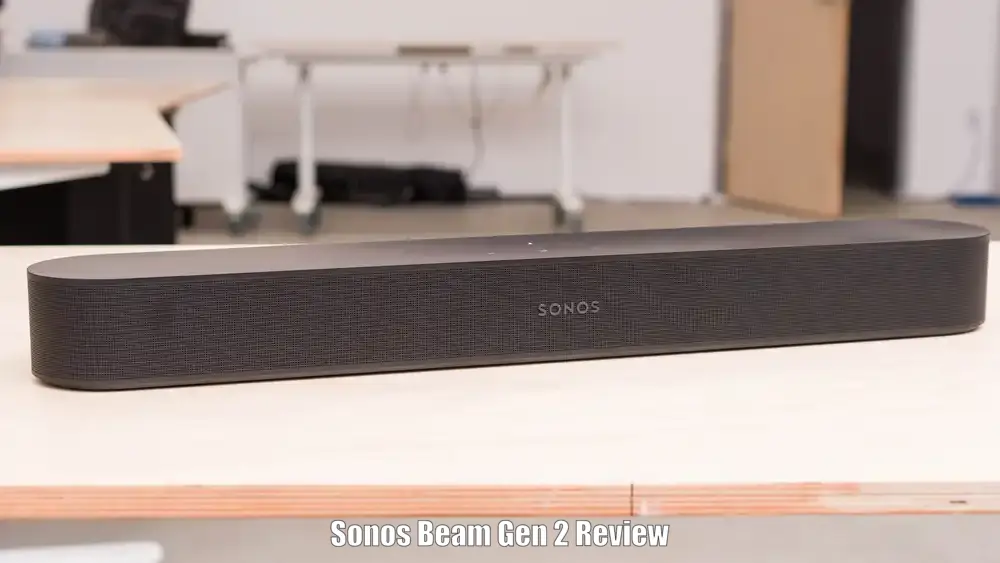
Introduction
We take a close look at the Sonos Beam Gen 2 to help readers decide whether this compact smart soundbar belongs under their TV. The Beam Gen 2 is a small footprint soundbar that adds Dolby Atmos virtualization, Sonos S2 app support, AirPlay 2 and easy integration into a multiroom Sonos system. It is aimed at people who want a neat, simple upgrade over TV speakers without committing to a large bar or full surround system.
Its strengths include very good dialogue clarity, a surprisingly wide perceived soundstage for its size and easy Sonos ecosystem setup. Its limitations are equally clear: Atmos is virtualized rather than produced by physical upfiring drivers, there is no Bluetooth, and low bass is limited unless you add a Sonos Sub. In this Sonos Bean Gen 2 review we will explain the Beam Gen 2’s key features, real world performance for movies music and games, setup and troubleshooting, how it stacks up against close Sonos alternatives and who should buy it.
Sonos Beam Gen 2 Review: Quick Verdict
Best For
People who want a compact soundbar that improves TV dialogue and offers Sonos multiroom streaming and AirPlay 2.
Not Ideal For
Buyers who need Bluetooth or multiple HDMI inputs, or those who expect deep bass without adding a subwoofer.
Top Strengths
Dolby Atmos virtualization that adds height cues, clear center-channel dialogue and tight mid-bass for its size.
Biggest Weaknesses
No Bluetooth, no extra HDMI inputs on the bar and limited deep low-end without Sonos Sub.
Bottom Line
The Sonos Beam Gen 2 review shows a compact, well-built soundbar that delivers roomy sound and top dialogue clarity for small-to-medium rooms. It is a strong choice for Sonos ecosystem users who accept the need for optional add-ons for true home theater levels of bass and surrounds.
Product Overview
The Sonos Beam Gen 2 is a compact smart soundbar designed to sit under or above a TV in a living room or bedroom. Its main highlights are virtualized Dolby Atmos support, HDMI eARC connectivity, Sonos S2 app control and AirPlay 2 streaming. The Beam Gen 2 targets users who want a neat, easy-to-install sound solution that improves TV audio and acts as a Sonos streaming node without the bulk of a full-size bar. It sits below Sonos flagship models in power and driver count but aims to balance size, usability and immersive processing.
Sonos Beam Gen 2 Specifications
| Specification | Detail |
|---|---|
| Product | Sonos Beam (Gen 2) |
| Category | Compact smart soundbar |
| Channels | 5.0 virtualized (Dolby Atmos virtualization) |
| Dolby Support | Dolby Atmos, Dolby Digital, Dolby Digital Plus, Dolby TrueHD, multichannel PCM |
| DTS | DTS Digital Surround (listed) |
| Connectivity | HDMI eARC/ARC, Ethernet, Wi‑Fi, AirPlay 2 |
| Bluetooth | Not supported |
| Expandability | Compatible with Sonos Sub and Sonos rear speakers |
| Voice Assistants | Amazon Alexa and Google Assistant support |
| Dimensions | 25.63 in × 2.72 in × 3.94 in (651 × 69 × 100 mm) |
| Weight | 6.2 lb (2.8 kg) |
| Colors | Matte black, Matte white |
| Release Year | 2021 |
Why These Specifications Matter
We want readers to understand what the numbers mean for day-to-day use. The 5.0 virtualized channel configuration means the Beam Gen 2 is built to create a sense of width and height without physical upfiring drivers. That gives a more immersive feeling than a plain stereo bar, but it cannot match the real overhead immersion of bars with dedicated height drivers. HDMI eARC is important because it is the cleanest path for Dolby Atmos from compatible streaming apps and set-top boxes.
No Bluetooth means the Beam relies on Wi‑Fi and AirPlay 2 for streaming, which works very well if your home network is solid but removes the quick phone-to-speaker pairing many buyers expect. Expandability with Sonos Sub and rear speakers lets us scale the system later when we want real low-end and surround presence.
Key Features Explained
We explain the most important features in plain terms so you know what they do and why they matter.
Dolby Atmos Virtualization
The Beam Gen 2 processes Atmos content to produce height and object cues from its five-driver array. For viewers who want overhead effects and better immersion without a large bar, this virtualization adds convincing height cues and a wider front-stage. It matters most in movies and modern streaming content where Atmos mixes are common. The trade-off is that virtualization cannot reproduce the same vertical precision as systems with physical upfiring drivers or a full 5.1.2 setup, so buyers seeking top-tier home theater immersion should consider larger options or add height-capable hardware.
HDMI eARC Connectivity
The single HDMI eARC/ARC port handles high-bitrate multichannel audio from the TV. In practice this means when the TV and source support eARC the Beam Gen 2 can receive Atmos and richer audio streams. This matters because many streaming apps send Atmos via the TV, not directly to the bar. The limitation is that the Beam has no other HDMI inputs, so all devices must pass through the TV. If your TV lacks eARC you will lose some high-bitrate formats unless you use an optical adapter.
Sonos S2 App and Multiroom Integration
The Sonos S2 app manages setup, updates, EQ and grouping with other Sonos speakers. This is where the Beam Gen 2 shines for people who already own Sonos gear. It matters because setup is straightforward and expanding to a Sub or rear speakers is easy. The app also provides AirPlay 2 access so streaming from Apple devices is convenient. The trade-off is that you rely on the Sonos ecosystem and network setup; there is no direct Bluetooth fallback.
Dialogue Clarity and Speech Enhancement
The Beam Gen 2 is tuned for clear, intelligible dialogue. That makes a real difference for TV shows, newscasts and movies where speech is critical. For people who frequently watch dialogue-heavy content this clarity is a major benefit. The limitation is that while mid-bass and punch are good for effects, deep sub-bass that gives rumble for big action sequences is limited without a Sonos Sub.
Voice Assistant Support
Built-in support for Amazon Alexa and Google Assistant lets us control playback and basic smart home tasks by voice. This is convenient for hands-free commands and integrates with Sonos features. Performance varies by room and setup, so users in noisy environments may see mixed results.
Expandability with Sub and Rear Speakers
Adding a Sonos Sub brings deep bass while adding rear Sonos speakers creates a true surround setup. This path matters for buyers who want to start with a compact bar and upgrade later. The trade-off is additional expense for a fuller home theater experience.
Who Should Buy This?

Ideal Buyers
We recommend the Beam Gen 2 for people who want a neat and modern soundbar that improves TV dialogue, offers Sonos streaming features and provides a taste of Atmos in a compact package. Small-to-medium rooms are an ideal environment. Buyers who value easy setup and expanding into a Sonos multiroom system will appreciate the Beam Gen 2.
Who Should Avoid It
We advise avoiding the Beam Gen 2 if you need Bluetooth connectivity, multiple HDMI inputs on the bar itself or true height-channel Atmos without extra hardware. If you want powerful sub-bass without adding a Sonos Sub, this is not the right single-component solution.
Best Use Cases
The Beam Gen 2 performs best as a living room TV upgrade, a compact streamer for music via AirPlay 2 or Sonos apps and a space-saving option for casual gaming where immersive front-stage presence is helpful.
Less Suitable Use Cases
Large dedicated home theaters, bass-heavy music listening without a sub and AVR-style multi-channel setups are less suitable without additional Sonos components.
Design and Build Quality
We find the Beam Gen 2 clean and low profile. It uses a matte-finish enclosure with a perforated grille that looks modern and is reportedly easier to keep clean than fabric alternatives. The bar is offered in matte black or white and feels solid and premium for its size. We like the compact dimensions because the bar fits under many TVs and can be wall-mounted if preferred. The construction is aimed at practical everyday use rather than flashy materials. The design choices emphasize a neat footprint, sensible mounting points and a grille that balances durability with appearance. Overall practicality is high; the only design trade-offs are a lack of extra HDMI ports and no built-in subwoofer.
Setup and Installation
Setup is straightforward through the Sonos S2 app. We plug the Beam into power, connect the single HDMI eARC/ARC cable to the TV and follow the on-screen Sonos steps to add the device to our Wi‑Fi. Trueplay room tuning is available through the Sonos app on iOS for users who want automatic calibration. If your TV lacks HDMI ARC or eARC the Sonos optical adapter provides a workaround for basic audio, but optical does not carry Atmos formats. The most common setup hiccups are related to TV audio settings and ARC/eARC configuration, not the Beam itself. Since there is no Bluetooth, network stability matters for streaming.@sachin-choudhary.
For more detailed information please refer to the official Sonos Beam Gen 2 user manual.
Real-World Performance
Movies and TV
When watching films the Beam Gen 2 makes clear improvements over typical TV speakers. Dialogue is focused and easy to follow, and the virtualized Atmos adds overhead cues that enhance immersion on height-enabled mixes. The soundstage feels wider than the bar’s physical width and gives a sense of separation between effects and center dialogue.
Bass is clean and punchy in the midrange, so explosions and impacts have presence, but deep sub-bass rumble is restrained without a Sonos Sub. For cinematic listening in a small-to-medium room the Beam Gen 2 delivers a genuinely better experience than built-in TV speakers. To get the most from Atmos content we recommend using HDMI eARC from an eARC-capable TV because that is the best path for Dolby Digital Plus and other high-bitrate codecs.
Music Listening
For music the Beam Gen 2 is impressive for a compact soundbar. Vocals are forward and clear, and instrument separation is better than expected. The width and imaging are suitable for casual music fans, and AirPlay 2 plus Sonos streaming options make it convenient as a dedicated streamer. The limitation is deep bass. Genres dependent on strong sub-bass such as EDM or heavy hip-hop are not the bar’s strong suit without the addition of a Sonos Sub. For most pop, rock and acoustic music the Beam Gen 2 is more than capable.
Gaming
The Beam Gen 2 is a good companion for console gaming provided the TV properly passes audio through eARC/ARC. The wide front-stage and clear effects help positional awareness and dialogue. The lack of direct HDMI inputs on the bar means consoles must route audio through the TV, which can introduce complexity if your TV’s passthrough or audio settings are limited.
Voice Content and Podcasts
Where speech is key we find the Beam excels. Dialogue and spoken-word content are clear and intelligible. This makes the Beam Gen 2 a strong choice for news, podcasts and talk shows. Its clarity is a standout feature across usage scenarios.
Indoor and Outdoor Use
The Beam Gen 2 is optimized for indoor living spaces. It is ideal for living rooms, dens and bedrooms. Outdoor use is not a primary design goal and weather or environmental factors would limit performance and reliability. For indoor listening the Beam performs consistently.
Best Settings
For movies we recommend using HDMI eARC when available to ensure the best Atmos passthrough. Trueplay room tuning on iOS helps optimize response for your room. For music use the Sonos app EQ adjustments to tailor bass and treble. If you need stronger low-end add a Sonos Sub and consider wireless rear speakers for true surround.
Amazon Customer Sonos Beam Gen 2 Review Rating
| Stars (4.5/5) | Review (89 global ratings) |
| 5 Star | 78% |
| 4 Star | 9% |
| 3 Star | 2% |
| 2 Star | 7% |
| 1 Star | 4% |
Why Customers Give Sonos Beam Gen 2 5 and 4 Star Ratings
After analyzing the customer reviews, we found that buyers who awarded the Sonos Beam Gen 2 four or five stars were consistently impressed by its ability to deliver premium sound from such a compact soundbar. The most frequently praised qualities are crystal-clear dialogue, a wide soundstage, balanced bass, and excellent performance for both movies and music. Many reviewers also appreciated the simple setup, reliable HDMI eARC connectivity, and the polished Sonos app.
A recurring trend we noticed is that users believe the Beam Gen 2 becomes significantly more immersive when paired with a Sonos Sub or surround speakers, creating a true home theater experience. While several reviewers mention that Dolby Atmos effects are subtle and the price is on the higher side, they still consider it a worthwhile investment because of its refined sound quality, expandability, and seamless integration within the Sonos ecosystem. Overall, satisfied buyers feel the Beam Gen 2 offers an excellent balance of performance, features, and long-term upgrade potential.
Why Customers Give Sonos Beam Gen 2 3-Star Ratings or Lower
After reviewing the lower-rated feedback, we found that most negative reviews stem from unmet expectations rather than universally poor sound quality. Several buyers expected a dramatic Dolby Atmos experience but felt the surround and height effects were barely noticeable in real-world use. Another recurring complaint involves dialogue balance, with some users reporting that background effects and bass occasionally overpower voices, forcing them to frequently adjust the volume during movies. Connectivity issues also appear in multiple reviews, including HDMI handshake problems with certain TVs, intermittent disconnections, and difficulties switching between TV sources.
We also noticed frustration surrounding the Sonos ecosystem itself. Features such as Alexa support, app-based controls, and network-dependent operation were viewed as inconvenient by some buyers, particularly in regions where official support is limited. Finally, several reviewers believe the Beam Gen 2 is overpriced as a standalone soundbar, arguing that achieving its full potential requires purchasing expensive accessories like the Sonos Sub and surround speakers, making the overall investment difficult to justify.
Connectivity and Smart Features
The Beam Gen 2 supports Wi‑Fi streaming via the Sonos S2 app and AirPlay 2 for Apple devices. There is a single HDMI eARC/ARC connection for TV audio and an Ethernet port if wired networking is preferred. Voice assistants Amazon Alexa and Google Assistant are supported for hands-free control. There is no Bluetooth option, so direct phone pairing is not available. Sonos S2 handles firmware updates, grouping and EQ adjustments. The connectivity suite works well within Sonos ecosystems, with the key limitation being reliance on TV passthrough for multiple source devices.
Common Problems and Troubleshooting
When the Beam Gen 2 produces no sound the most common causes are TV audio output not set to ARC/eARC or HDMI not in the correct port. Atmos may fail to play if the TV or source device is not passing Atmos via eARC. Streaming dropouts usually point to Wi‑Fi instability; switching to wired Ethernet or improving the Wi‑Fi signal helps. Lack of deep bass is normal for a compact bar, and the recommended solution is adding a Sonos Sub. For app setup failures ensure your phone or tablet is on the same network and the Sonos S2 app is up to date.
Competitor Comparisons
Sonos Beam Gen 1
When we compare the two generations the Beam Gen 2 brings Dolby Atmos virtualization and updated processing while the Gen 1 is a simpler 3.0 design without Atmos. Choose the Beam Gen 2 if you want Atmos cues and improved processing. The Gen 1 remains an option for buyers prioritizing lower cost where available.
Sonos Arc
Compared with the Arc the Beam Gen 2 is far more compact and less expensive while the Arc offers physical height channels and a larger driver array for stronger Atmos performance. We would choose the Beam Gen 2 for small rooms and neat setups. For large rooms and maximum home theater immersion the Arc is preferable.
Bose Smart Soundbar and Samsung HW-series Compact Bars
Some competing compact bars may offer different connectivity options or physical upward-firing drivers depending on model. We recommend choosing those alternatives if you need built-in Bluetooth or multiple HDMI inputs. If you value Sonos multiroom integration and AirPlay 2 the Beam Gen 2 is the sensible pick.
Pros and Cons
Pros
- Compact form factor with wide perceived soundstage
- Clear, intelligible dialogue and center focus
- Dolby Atmos virtualization for added immersion
- Strong Sonos ecosystem integration and AirPlay 2 support
- Easy setup and expandability with Sonos Sub and rear speakers
Cons
- No Bluetooth support
- No multiple HDMI inputs or passthrough on the bar
- Atmos is virtualized not produced by upfiring drivers
- Limited low-end extension without Sonos Sub
- Best Atmos performance depends on TV eARC support
Value for Money
The Beam Gen 2 offers features that justify its positioning for buyers who prioritize compact size, Sonos integration and virtualized Atmos. Its strengths are most valuable to people who want convenience, clarity and the ability to expand later. It becomes less compelling for buyers who require Bluetooth or multiple HDMI inputs built into the bar, or for those who need deep bass without buying a separate subwoofer.
Final Verdict
The Sonos Beam Gen 2 review shows a thoughtfully engineered compact soundbar that answers the needs of many modern living rooms. Its biggest strengths are excellent dialogue clarity, a surprisingly wide soundstage for its size, and seamless Sonos integration. Its biggest weaknesses are the lack of Bluetooth, no additional HDMI inputs on the bar and limited deep bass without adding a Sonos Sub. If we want a compact, easy-to-install upgrade to TV sound with the option to expand into a fuller system later, the Beam Gen 2 is a strong choice. If our priorities are physical height channels, powerful sub-bass or multiple HDMI device hookups built into the bar, we should consider larger Sonos models or other brands.
Does the Sonos Beam Gen 2 support Dolby Atmos?
Yes. The Beam Gen 2 supports Dolby Atmos but delivers it via virtualization rather than with physical upfiring drivers.
Is the Sonos Beam Gen 2 loud?
The Sonos Beam Gen 2 produces strong output and a room-filling perceived width for its compact size.
Is the Sonos Beam Gen 2 worth it?
The Sonos Beam Gen 2 is worth considering if you want a compact soundbar with Sonos integration and Atmos virtualization. It depends on needing Bluetooth multiple HDMI inputs or deep bass without add-ons.
Can the Beam Gen 2 be expanded with a subwoofer or rear speakers?
Yes. The Beam can be paired with a Sonos Sub and Sonos rear speakers to create a fuller surround system.