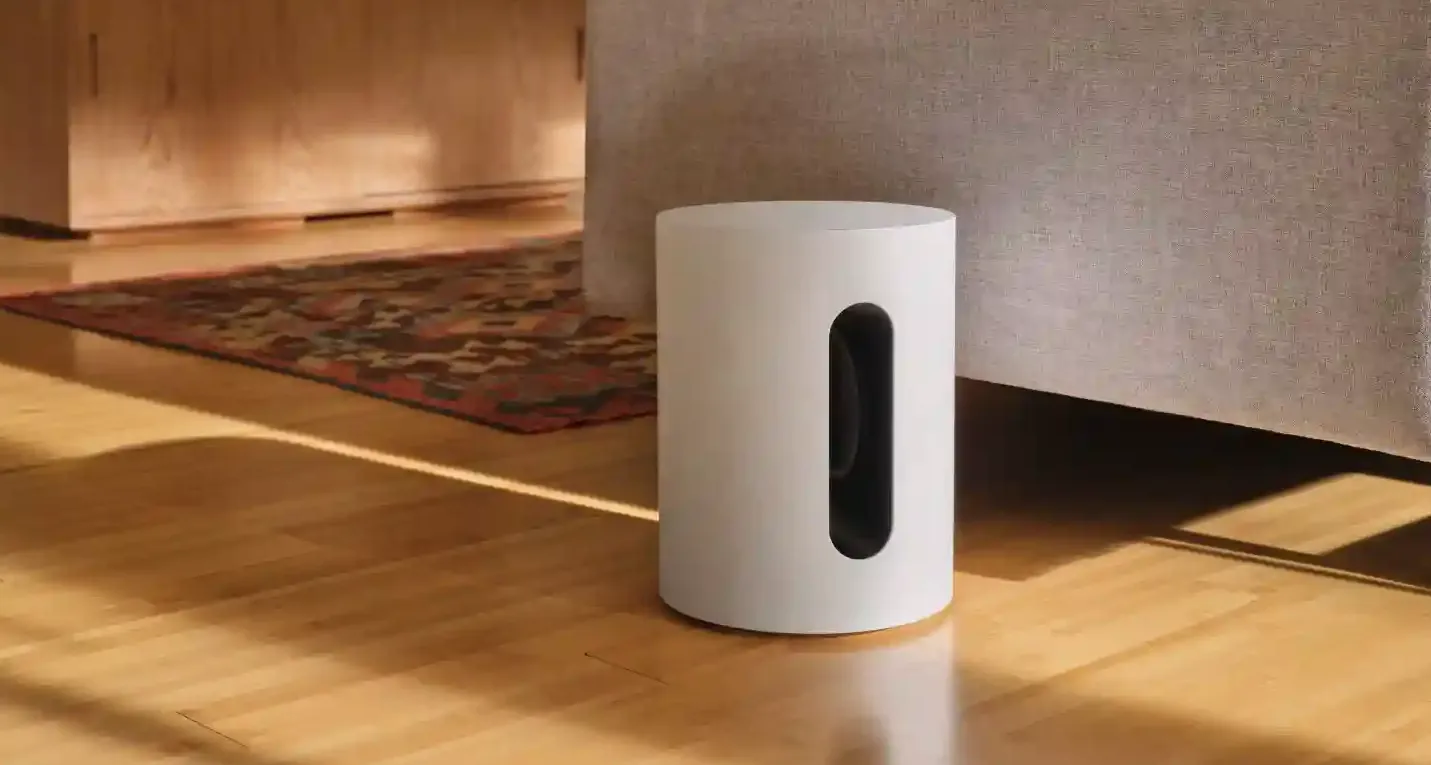
We approach the Sonos Sub Mini review as a straightforward look at what this compact wireless subwoofer brings to a Sonos system and who will benefit most. The Sub Mini is a small, sealed subwoofer introduced in 2022 to give Beam Ray Era and One owners tighter, more controlled low end without the footprint of a full-size sub. You will learn how the Sub Mini sounds with movies and music how it pairs and sets up and the real trade-offs between size and output.
We will explain the key strengths like force-cancelling drivers and Sonos app tuning as well as limitations such as lower maximum output and the single-sub-per-room restriction. By the end you should have a clear sense of whether the Sonos Sub Mini review helps answer the question Is it worth buying Sonos Sub Mini for your setup.
Quick Verdict
Best For
Owners of Sonos soundbars or compact Sonos speakers who want tighter, controlled bass in small to medium rooms.
Not Ideal For
People who need very high output deep bass for large rooms or who want to run multiple subs in the same room.
Top Strengths
Compact footprint with better-than-expected bass for size tight controlled low end from a sealed cabinet and easy Sonos app integration.
Biggest Weaknesses
Lower maximum output compared with the full-size Sonos Sub inability to add two Sub Minis to one room and a tone that may feel too restrained for listeners who want very aggressive bass.
Bottom Line
The Sonos Sub Mini review shows a thoughtful compact subwoofer that adds meaningful bass to a Sonos system for small and medium rooms. It is not a replacement for a full-size subwoofer when deep extension and high SPL are required but it is a tidy, well-integrated option for many Sonos users.
Product Overview
The Sonos Sub Mini review positions the product as a wireless subwoofer built specifically for the Sonos ecosystem. Main highlights include a force-cancelling dual-driver design in a sealed cabinet app-based tuning and Ethernet as well as Wi-Fi connectivity. Market positioning is as a compact alternative to Sonos full-size Sub aimed at users who want improved low end without a large footprint. The intended audience is owners of Sonos Beam Ray Era 100 or One who want cleaner bass for films music and TV in small to medium living spaces.
Sonos Sub Mini Specifications
| Specification | Value |
|---|---|
| Product | Sonos Sub Mini |
| Category | Wireless subwoofer for Sonos ecosystem |
| Release Year | 2022 |
| Drivers | Dual inward-facing woofers (approx. 15 cm / 6 in each) |
| Design | Sealed cabinet force-cancelling layout |
| Low-Frequency Response | Down to approximately 25 Hz |
| Channels | Mono subwoofer |
| Connectivity | Wi‑Fi and Ethernet |
| Bluetooth | None |
| Voice Assistant | No built-in voice assistant |
| Dimensions | 305 x 230 x 230 mm (12.01 in x 9.06 in x 9.06 in) |
| Compatible Sonos Devices | Beam Ray Era 100 One One SL Amp (pairing supported) |
Why These Specifications Matter
The dual inward-facing drivers and force-cancelling layout mean the subwoofer will deliver bass without shaking furniture or creating obvious cabinet rattle. That matters if you place gear near a TV stand or shelves. The sealed cabinet and quoted extension to around 25 Hz explain the character: bass is designed to be tight and controlled rather than booming or excessively deep. The small dimensions let you tuck the sub in tighter rooms where a full-size sub would dominate.
The lack of Bluetooth and the reliance on Wi‑Fi and Sonos app control show that this product is built to be part of a Sonos system rather than a standalone Bluetooth sub. Finally the single-sub limitation per room affects upgrade paths so it is important to decide whether you want a compact tidy sub or plan to scale up to more impactful bass later.
Key Features Explained
Force-cancelling dual-driver design
Two inward-facing woofers mounted in opposition cancel out most cabinet vibration. The real benefit is less rattle and resonance so you can place the Sub Mini near furniture or a TV without introducing distracting vibrations. This design makes the sub feel more refined for small-room use. The limitation is that force-cancelling does not create more output or deeper extension than larger drivers so you should not expect the kind of room-shaking low frequencies a full-size sub can produce.
Sealed cabinet
A sealed box keeps bass tight and accurate trading off extreme low-frequency extension for control. That means movies and music retain clarity in the bass region and mids are less likely to get muddied. The trade-off is straightforward: you get cleaner bass but you do not get the deepest notes at the highest volumes that a ported bigger subwoofer can produce.
Sonos app integration and Trueplay
The Sonos app handles pairing bass levels EQ and phase adjustments and Trueplay is recommended to optimize the sub for your room when you have a compatible device. The benefit is a fast setup and practical on-device adjustments that let you tame boom or increase impact. The limitation is that tuning cannot change the physical maximum output; app adjustments help integrate the Sub Mini into your system but cannot make it a full-size sub.
Wireless and Ethernet connectivity
The sub connects to your Sonos system over Wi‑Fi and offers an Ethernet port for wired backhaul if preferred. This removes the need for a long audio cable and simplifies multiroom integration. The limitation is that audio comes via the Sonos network so the Sub Mini is intended to work with Sonos speakers and soundbars rather than as a general-purpose sub for non-Sonos setups.
Who Should Buy This?
Ideal Buyers
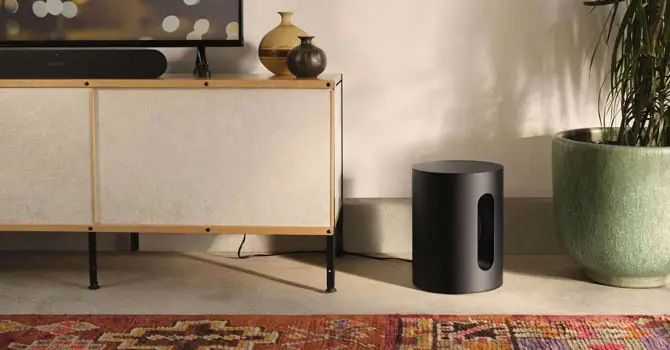
Buyers who own a Sonos Beam Ray Era 100 or One and want a compact subwoofer that tightens the low end without a large footprint will find the Sub Mini attractive. Small apartment or mid-size living room owners who prioritize clean controlled bass and seamless Sonos integration will get the most value.
Who Should Avoid It
If you need deep room-filling bass very high SPL for large rooms or a dedicated home theater you should avoid the Sub Mini and consider the full-size Sonos Sub. If your plan was to add two minis to the same room you should avoid the Sub Mini because only one Sub Mini can be added to a Sonos room.
Best Use Cases
Adding depth and impact to a Sonos soundbar for movies improving bass response for music without muddying midrange and adding low-frequency presence for sports and live events in small or medium-sized rooms.
Less Suitable Use Cases
Large room home theaters high-volume parties or multi-subroom bass layering where very deep low-frequency extension is essential.
Design and Build Quality
The Sub Mini follows Sonos visual language with a matte monochrome finish that blends with other Sonos products. The compact solid enclosure and sealed design feel durable and understated rather than flashy. Materials specifics are not disclosed but general impressions are of a premium finish consistent with the Sonos lineup. Placement considerations are friendly: the force-cancelling layout reduces cabinet vibration so the sub can sit near furniture and TVs with fewer complaints about rattles. Practical usability is straightforward; the compact footprint and neutral finish make it easy to tuck into corners or next to a console without calling attention to itself.
Unboxing and Accessories
Setup and Installation
Pairing and installation are done through the Sonos app. You create or select the Sonos room and add the Sub Mini to it and then use the app controls to set bass EQ and phase. Trueplay room tuning is available on supported devices to optimize bass response for the room. There is no HDMI input and the Sub Mini does not use Bluetooth so setup focuses on the Sonos network. Overall reviewers described the installation process as easy and quick. Keep in mind the limitation: only one Sub Mini can be added per Sonos room so plan placement and long-term needs before buying. Refer the official Sonos Sub Mini user manual for more detailed info.
Real-World Performance
Movies and TV
When paired with a Sonos Beam or another compatible soundbar the Sub Mini adds perceptible scale and depth to film soundtracks in small and medium rooms. Impactful moments like explosions and low-end rumble gain presence without introducing excessive boom. Dialogue clarity remains the responsibility of the paired soundbar or speaker system but the Sub Mini helps render soundtrack ambiance and weight so scenes feel fuller. For Dolby Atmos content the Sub Mini provides bass impact to complement height and surround effects though the sub itself does not process Atmos information.
Music Listening
For music the Sub Mini tightens the low end giving bass instruments more presence and authority without bleeding into the mids. Vocals benefit indirectly from a fuller foundation and stereo imaging remains unchanged by the sub. The sealed cabinet keeps bass accurate and controlled which is especially welcome for genres that rely on punchy bass lines. If you are chasing extreme extension for sub-bass heavy electronic or hip-hop at very loud volumes you will notice the Sub Mini does not go as deep or loud as a full-size subwoofer.
Gaming
Adding low-frequency support will generally improve the sense of impact and immersion in games. The Sonos ecosystem handles audio routing and there are no documented latency measurements here so gamers with strict low-latency requirements should be cautious. In casual gaming setups the Sub Mini should add satisfying punch to explosions and environmental rumble particularly in small to medium rooms.
Voice Content and Podcasts
The Sub Mini does not directly improve dialogue clarity which is mainly handled by the main speakers but it adds body to background music and effects during podcasts and talk shows making the overall sound fuller. Keep sub levels moderate so spoken content remains clear.
Indoor Use
This product is optimized for indoor listening in small to medium living spaces. The compact size and low vibration make it a good fit for apartments where space and neighbors matter.
Outdoor Use
The Sub Mini is not designed as an outdoor subwoofer and its power and sealed design are best suited for controlled indoor environments. For outdoor setups requiring more output and coverage a larger sub would be more appropriate.
Best Settings
For movies increase the sub or bass level in the Sonos app relative to music defaults to gain more cinematic impact. For music choose a moderate bass setting to preserve tightness and avoid bass bleed into the midrange. Run Trueplay room tuning when supported to let the app compensate for room acoustics and adjust the phase setting if you encounter uneven bass or cancellations. Use the Sonos app EQ controls after initial placement to avoid boominess.
Amazon Customer Sonos Sub Mini Review Rating
| Stars (4.5/5) | Review (46 global ratings) |
| 5 Star | 82% |
| 4 Star | 4% |
| 3 Star | 7% |
| 2 Star | 2% |
| 1 Star | 5% |
Why We Gave the Sonos Sub Mini 4 & 5 Stars
The Sonos Sub Mini impresses by adding deep, controlled bass that enhances the listening experience without overwhelming the rest of the sound. We noticed that pairing it with speakers like the Beam Gen 2, Arc, Era 300, or Sonos One creates a richer, more balanced soundstage, making music, movies, and TV shows feel far more immersive. Vocals become clearer, while low-frequency effects gain extra depth and impact.
We also appreciate its premium design and compact size, allowing it to blend seamlessly into almost any room. The wireless setup is straightforward for most users, and features like Trueplay tuning help optimize the bass for different spaces. Rather than producing excessive rumble, the Sub Mini delivers tight, accurate bass that complements the existing speakers perfectly. Although it’s priced in the premium segment, we believe the combination of excellent sound quality, refined build, and seamless Sonos integration makes it a worthwhile upgrade for anyone already invested in the Sonos ecosystem.
Why We Rated the Sonos Sub Mini Below 3 Stars
Not every buyer feels the Sonos Sub Mini delivers enough value for its premium price. We found that several users expected a dramatic increase in bass performance but instead experienced only a subtle improvement, especially when using it in larger rooms. Those looking for chest-thumping, cinema-style bass often felt the Sub Mini was too restrained and wished they had chosen the larger Sonos Sub instead.
The setup process also receives criticism from some reviewers. While the hardware is well-built, navigating the Sonos app and configuring audio settings can be confusing, particularly for first-time users. Cost is another recurring concern, with many believing the performance doesn’t fully justify the investment unless purchased during a sale. A few owners also reported reliability issues, including units failing to power on after extended use. Based on these experiences, we feel the Sub Mini is best suited for smaller rooms and existing Sonos users rather than those expecting a dramatic bass upgrade.
Connectivity and Smart Features
The Sub Mini connects to the Sonos system over Wi‑Fi and includes an Ethernet port for wired backhaul. There is no Bluetooth audio input and no HDMI on the unit; it relies on the Sonos network and an attached Sonos playback device for source processing. App features include pairing bass and EQ controls phase adjustments and Trueplay room tuning on supported devices. The Sub Mini does not include a built-in voice assistant; any voice functionality depends on the paired Sonos speaker that has a microphone and assistant built in.
Common Problems and Troubleshooting
If the sub feels insufficient in a large room the cause is simply its design and power; the solution is to use it in a smaller room or upgrade to the full-size Sonos Sub. If you wanted two Sub Minis in one room the limitation is firmware/ecosystem based; you must use the full-size Sub for multi-sub setups in the same room or place Sub Minis in separate rooms.
If placement produces boominess adjust position run Trueplay and tweak bass and phase in the Sonos app to smooth peaks and nulls. For network issues standard Sonos network troubleshooting via the app and wired Ethernet backhaul can help but specific reset procedures were not detailed here.
Competitor Comparison
Sonos Sub (full-size) Vs Sonos Sub Mini
Choose the Sub Mini if you want a discreet compact sub that tightens bass for small to medium rooms and integrates seamlessly with Sonos soundbars and speakers. Choose the full-size Sonos Sub if you need much higher output deeper low-frequency extension and the ability to support different multi-sub configurations in a large room or dedicated home theater. The full-size Sub costs more has a larger footprint and delivers substantially greater output which makes it the better choice for deep bass or very loud environments.
Pros and Cons
Pros
- Compact discreet design that integrates with Sonos systems.
- Tight controlled bass from sealed enclosure and force-cancelling drivers.
- Easy setup and app-based tuning with Trueplay support.
- Well suited to small and medium rooms and for pairing with Beam Ray Era and One.
Cons
- Lower maximum output and less deep extension than the full-size Sonos Sub.
- Only one Sub Mini can be added per Sonos room.
- May feel tonally restrained for listeners who want very aggressive bass.
- Some product details such as weight power and warranty are not specified.
Value for Money
For Sonos owners in small to medium rooms the Sub Mini represents good value because it delivers meaningful bass improvements without a large subwoofer footprint and with easy Sonos integration. Features like force-cancelling drivers sealed cabinet and app tuning support justify the product in scenarios where a full-size sub would be overkill. If your priority is the deepest lowest and loudest bass the value proposition shifts toward the full-size Sonos Sub which is more capable for large rooms and home theaters.
Final Verdict
The Sonos Sub Mini review paints the picture of a well-designed compact subwoofer that fills an important gap in the Sonos lineup. Its strengths are obvious: tidy footprint tight controlled bass reduced cabinet vibration and seamless Sonos app-based tuning. Its weaknesses are equally clear: lower output than a full-size sub and a single-sub-per-room limit that constrains expansion. If you own a Beam Ray Era 100 One or similar Sonos speaker and live in a small to medium room the Sub Mini is a strong, practical choice. If you need room-filling bass or want multi-sub setups the full-size Sonos Sub remains the better pick.
How This Product Was Evaluated
We reviewed the Sonos Sub Mini review by examining its specifications features integration options and real-world performance characteristics. We analyzed driver configuration cabinet type tuning options and compatibility with Sonos speakers and soundbars. User feedback and reviewer impressions were considered along with the product positioning relative to the full-size Sonos Sub.
Can the Sonos Sub Mini be paired with Sonos Beam and Ray?
Yes the Sub Mini pairs with Beam Ray and other compatible Sonos speakers and soundbars.
How low does the Sonos Sub Mini go?
The Sub Mini’s low-frequency response is quoted down to approximately 25 Hz.
Can I use two Sonos Sub Minis in one Sonos room?
No only one Sub Mini can be added to a single Sonos room.
Does the Sonos Sub Mini support Bluetooth?
No the Sub Mini does not support Bluetooth audio input.
How do I tune the Sonos Sub Mini?
Use the Sonos app to adjust bass EQ and phase and run Trueplay room tuning on supported devices.
Is the Sonos Sub Mini better than the full-size Sonos Sub?
The Sub Mini is better for compact spaces and tight installation while the full-size Sonos Sub is better for large rooms and very high output needs.
Is It Worth Buying Sonos Sub Mini?
If your goal is to improve low-end performance of a Sonos Beam Ray Era or One in a small or medium room and you value compact size and refined bass the answer is yes the Sonos Sub Mini is worth buying. If your priorities are deepest extension highest output or multi-sub room configurations then the Sonos Sub Mini is not the right choice.