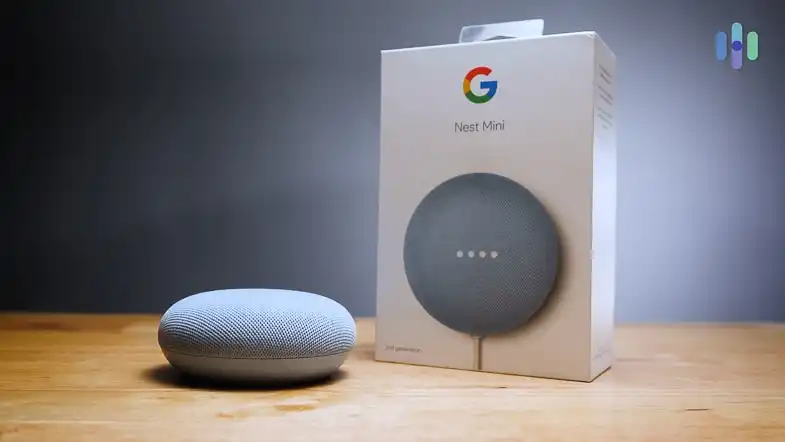
This Google Nest Mini review covers what the device is and who it was designed for while keeping the focus on practical buying choices. The Nest Mini is a compact voice activated smart speaker that brings Google Assistant to a small footprint meant for desks, bedside tables, and small rooms. The product targets people who want inexpensive, hands free answers, timers, smart home control, and the ability to cast audio to Chromecast enabled devices. The main strengths are the built in Google Assistant integration, stated improvement in bass versus the original Mini, and tight compatibility with the Google Home app and Google Cast ecosystem.
The main limitations are the requirement for the Google Home app and a Google account for setup and management, and setup restrictions on certain enterprise Wi Fi networks. In this Google Nest Mini review readers will find a clear summary, a balanced assessment of real world performance for music and media, setup and troubleshooting guidance, who should buy and who should avoid, and how it stacks up against nearby competitors. This review highlights verified facts and practical advice so the next step toward a purchase is clearer.
Google Nest Mini Review: Quick Verdict
Best For
People who want a low cost, compact smart speaker with deep Google Assistant and Google Home ecosystem integration.
Not Ideal For
Anyone who cannot or will not use the Google Home app or a Google account, and users who need verified high fidelity speaker specs.
Top Strengths
Built in Google Assistant, Chromecast compatibility, and a manufacturer claim of stronger bass than the previous Mini.
Biggest Weaknesses
Requires the Google Home app and account for setup and management, and it has network setup limits on enterprise WPA 2 Enterprise networks.
Bottom Line
This Google Nest Mini review shows that the Nest Mini is a practical, small room smart speaker aimed at convenience and Google integration rather than audiophile performance. It is a sensible upgrade for original Mini owners and a good pick for anyone invested in Google services.
Product Overview
The Google Nest Mini review places this product in the compact smart speaker category. Announced in 2019 as the second generation Mini, the device emphasizes voice first convenience with Google Assistant built in, a compact form factor for easy placement, and claimed audio improvements over its predecessor. It is positioned as an inexpensive entry point to whole home voice control and casting, suitable for users who want quick access to music, timers, answers, and smart home control without taking up much space.
Google Nest Mini Specifications
| Product name | Google Nest Mini 2nd generation |
| Brand | Google Nest |
| Category | Compact voice activated smart speaker |
| Release year | 2019 |
| Voice assistant | Built in Google Assistant |
| Wi Fi support | 2.4 GHz and 5 GHz networks supported for setup |
| Bluetooth | Bluetooth required during Android setup |
| Chromecast support | Compatible with Google Cast for streaming to Chromecast enabled devices |
| Intended placement | Desks bedside tables small rooms |
| Launch price at release | US 49 |
Why These Specifications Matter
Built in Google Assistant is the core of the experience and determines how hands free interactions work for answers timers and smart devices. Wi Fi dual band setup support makes it flexible for most home networks but the lack of support for WPA 2 Enterprise during setup means workplace or complex campus networks can block onboarding. Bluetooth being required during Android setup is an important practical detail that affects the first time experience.
Chromecast compatibility is useful because it lets the Nest Mini act as a voice controller and cast controller for TVs and other cast enabled devices. The compact size is a trade off that prioritizes convenience and placement over room filling audio. Knowing these trade offs helps decide whether the Nest Mini fits your needs.
Key Features Explained
Built in Google Assistant
The assistant is the device’s central feature. It answers questions sets timers controls compatible smart devices and manages basic media playback through voice commands. For people invested in Google services this feature provides seamless access to calendars reminders and search style queries. The benefit is hands free convenience and wide compatibility with the Google Home app ecosystem. The limitation is that the full experience requires a Google account and the Google Home app for setup and ongoing management.
Manufacturer stated bass improvement
Google advertises the Nest Mini as having 40 percent stronger bass than the original Home Mini. That marketing claim means the unit aims to deliver fuller low end compared with the previous generation. For casual listening in small rooms that can make songs and podcasts feel richer, especially when compared to an older Mini. Keep in mind this is a manufacturer claim rather than a set of objective lab measurements, so the improvement should be considered a meaningful step up within the compact Mini class rather than a replacement for a dedicated speaker with high fidelity bass.
Chromecast and Google Cast compatibility
The Nest Mini can act as a cast target and voice controller for Chromecast enabled devices. That makes it useful if there is a Chromecast TV or other cast devices in the home. The real world benefit is being able to tell the speaker to play content on the TV or to group audio across cast enabled devices using the Google Home app. If streaming to a TV is part of your daily routine this compatibility is a practical convenience.
Google Home app setup and multi room grouping
The device requires the Google Home app for setup and ongoing management. The app based flow allows assigning the device to a room creating multi room audio groups and adjusting volume and settings. This centralized management is practical because it keeps everything in a single place. The trade off is that those who avoid app based ecosystems or do not have a Google account will not get the intended experience.
Compact form factor
A small footprint makes placement effortless on a desk a nightstand or a countertop. That portability and unobtrusiveness is one of the device’s strongest selling points. It matters when space is limited or when a subtle presence is preferred over a large speaker. The trade off is that physical size limits output and stereo imaging compared with larger multi driver speakers.
Who Should Buy Google Nest Mini?
Ideal buyers
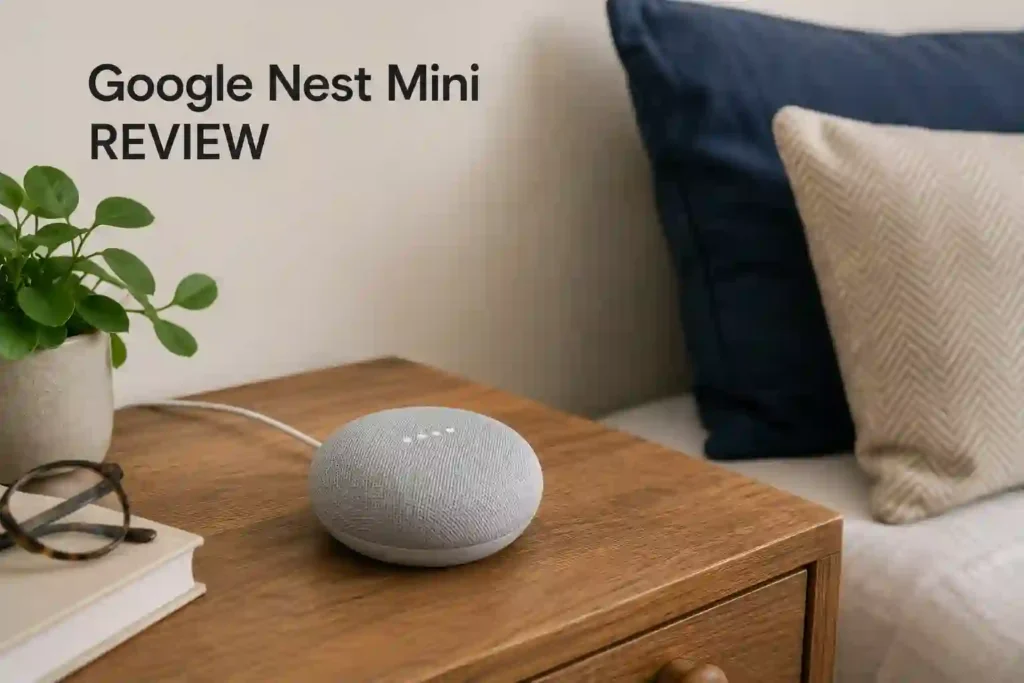
Those who want an inexpensive easy to place smart speaker that integrates tightly with Google Assistant and the Google Home ecosystem. People who will use voice commands for timers music casual listening smart home control and casting to Chromecast enabled TVs. Upgraders from the original Home Mini who want better bass without changing ecosystem.
Who should avoid it
Anyone who cannot or will not use the Google Home app or a Google account. Users who require verified high fidelity audio specifications or need measured performance data for pro audio use. People who must set the device up on WPA 2 Enterprise networks for work or campus environments.
Best use cases
Desk side bedroom or kitchen voice assistance controlling smart lights or thermostats casual music listening and casting audio to a Chromecast TV.
Less suitable use cases
Large room main listening speaker or situations where verified professional audio measurements and multi channel surround are required.
Design and Build Quality
In this Google Nest Mini review the design is consistently described as compact and unobtrusive. The finish options include a Chalk color among others depending on region. Materials and exact construction details are not specified in available public product information, but the device is shown and described as suitable for placement in any room. Durability and long term build observations are not documented in the sources used here, so expectations should be moderate.
Placement considerations are straightforward; the device is sized to live on a bedside table desk or counter. Wall mounting support is not specified, so if wall placement is essential plan on shelf or surface placement. The practical usability is where the design shines: it does voice tasks and casting without taking up much space.
Setup and Installation
Setup is app driven and you can refer to the official manual of Google Nest Mini user manual. Plug the Nest Mini into power open the Google Home app on a compatible phone or tablet and follow the on screen steps. For Android devices Bluetooth must be enabled during setup. Expect to scan a QR code or enter a setup code if prompted then choose a home and room and connect to Wi Fi. The device supports both 2.4 GHz and 5 GHz networks during setup, but it does not support WPA 2 Enterprise networks, so corporate networks may block onboarding.
If the Nest Mini was previously linked to another account a factory reset is required before it can be set up again. The process is guided in the app and reviewers noted the flow is generally easy when phone Bluetooth and Wi Fi are configured correctly.
Real World Performance
Movies and TV
The unit can be used to cast audio to a Chromecast TV and to control playback via voice. The manufacturer claims stronger bass than the original Mini which should help for casual TV viewing and background audio. Detailed tests on dialogue clarity surround performance or Dolby processing are not available, so make buying decisions with the understanding that the Nest Mini is optimized for convenience and voice control rather than delivering immersive cinematic sound.
Music listening
For music the Nest Mini aims to be bigger and better than the original Mini by delivering a fuller low end as part of the manufacturer claim of 40 percent stronger bass. That claim and reviewer comments imply more satisfying casual listening for pop podcasts and voice heavy content. Expect good results for background music and small room listening. Objective measurements of frequency response instrument separation and soundstage are not available in the provided material, so the speaker should be considered a small room casual listening device rather than an audiophile main speaker.
Gaming
The Nest Mini is not positioned as a gaming audio solution. There is no verified data on latency positional audio or immersion. For gameplay where responsiveness and low latency are critical it is safer to use gaming oriented audio hardware. The Nest Mini will handle voice commands and background audio but it is not designed as a front line gaming speaker.
Voice content and podcasts
Voice content benefits from Google Assistant responsiveness and the speaker’s ability to deliver clear spoken word in most small room environments. The manufacturer and reviewers emphasize the assistant integration and faster voice command response than the original Mini. The Nest Mini is well suited for podcasts and spoken word thanks to its voice centric design and Assistant features.
Indoor use
The device excels indoors in bedrooms kitchens offices and similar small spaces. Placement is easy and the compact design means it can sit unobtrusively where needed. The speaker is intended for small room usage and integration with other Nest devices for multi room setups is supported through the Google Home app.
Outdoor use
Outdoor usage is not the Nest Mini’s intended scenario. It lacks outdoor ruggedization details and specifications for battery operation are not provided. For outdoor listening consider purpose built outdoor speakers.
Best Sound Setting For Google Nest Mini
There are no vendor published EQ presets or official best sound setting recommendations in the available product information. The Google Home app provides device level volume and basic settings after setup but specific manufacturer recommended equalizer presets or community recommended settings are not documented in the verified sources used here. If seeking the Best Sound Setting For Google Nest Mini keep in mind the device is optimized for casual small room listening and that app based volume and basic adjustments are the available controls.
Amazon Customer Google Nest Mini 2nd Review Rating
| Stars (4.3/5) | Review (2,135 global ratings) |
| 5 Star | 73% |
| 4 Star | 9% |
| 3 Star | 6% |
| 2 Star | 2% |
| 1 Star | 10% |
Why Users Are Giving 4 and 5-Star Reviews
Most users rate the Google Nest Mini (2nd Gen) highly because it delivers excellent value for its price. Reviewers frequently praise how quick and simple the setup process is, with the speaker connecting seamlessly to the Google Home app and integrating effortlessly into existing smart home systems. Many buyers use it to control lights, smart plugs, thermostats, and Nest Doorbells, making everyday tasks much more convenient.
Another major reason for positive reviews is the improved sound quality over the previous generation. Users mention noticeably stronger bass, clear vocals, and surprisingly rich audio considering the compact size. Many also appreciate using multiple Nest Mini speakers together for whole-home music playback.
Google Assistant is another standout feature. Buyers love the accurate voice recognition, ability to handle multiple commands, set alarms, answer questions, check the weather, and play music hands-free. The compact design, affordable price, reliable Bluetooth connectivity, and dependable performance make it an excellent entry-level smart speaker for most households.
Why Users Are Giving Below 3-Star Reviews
Most low-rated reviews are not directed at the Google Nest Mini itself, but rather at the versions some sellers ship. Several buyers received international models that initially booted in Japanese or Chinese instead of English. While many eventually changed the language through the Google Home app or Google Support, users felt the process was confusing and poorly disclosed before purchase.
Some reviewers also reported that certain region-locked devices had compatibility problems with services such as Apple Music or lacked full functionality because they were intended for another market. These buyers recommend purchasing directly from Google or an authorized retailer to avoid regional restrictions.
A few users mention that voice recognition can occasionally struggle with non-English accents or Spanish commands. Others were disappointed that the Nest Mini still lacks promised Gemini AI integration or experienced occasional app pairing issues when using multiple speakers. Overall, most negative reviews focus on regional software restrictions, setup frustrations, and seller-related issues rather than the speaker’s sound quality or hardware.
Connectivity and Smart Features
Connectivity in this Google Nest Mini review centers on Wi Fi Bluetooth and Google Cast. The device supports 2.4 GHz and 5 GHz networks during setup and Bluetooth must be on for Android setup flows. Chromecast compatibility allows controlling and casting content to Chromecast enabled TVs. The Google Home app handles device naming room assignment volume and multi room grouping. Google Assistant is the built in voice agent for queries timers alarms news weather and smart home control. The ecosystem orientation is a strength for users invested in Google services and a limitation for those who prefer not to use app driven setup.
Common Problems and Troubleshooting
When the Nest Mini is not discovered during setup make sure the phone or tablet is on the same Wi Fi network and that Bluetooth is enabled on Android devices. Update or install the Google Home app and grant the necessary permissions. If the device was previously linked to a different account perform a factory reset before trying to set it up under a new account. For corporate Wi Fi issues avoid WPA 2 Enterprise networks and use a supported home Wi Fi or a guest SSID with WPA WPA2 PSK for setup.
Factory reset steps are recommended for previously used devices and the typical approach for the Nest Mini family involves pressing and holding the reset control under the power cord until a confirmation sound is heard. Use reset when ownership transfers or when setup repeatedly fails.
Competitor Comparison
Google Home Mini original
If upgrading from the original Home Mini choose the Nest Mini for the stated improvement in bass and faster assistant performance. The Nest Mini is positioned as the successor and is a direct upgrade path for those already using the original Mini.
Amazon Echo Dot
If voice assistant choice and ecosystem are central to the decision think about which voice platform is preferred. The Nest Mini will appeal to those invested in Google Assistant and Google Home app management. Those evaluating alternatives should compare platform features and integration needs before deciding.
Apple HomePod mini
For those in the Apple ecosystem device choice must reflect preferred voice assistant and platform compatibility. The Nest Mini suits Google centric users who prioritize Google Assistant and Chromecast based casting rather than Apple centric services.
Sonos One
Choose Sonos One if multiroom audio fidelity and integration with Sonos systems matter more than a compact low cost device. The Nest Mini is better if compact size low cost and Google Assistant integration are the primary goals.
Pros and Cons
Pros
Built in Google Assistant; Manufacturer claimed 40 percent stronger bass versus the original Mini; Chromecast and Google Cast compatibility for streaming to Chromecast enabled devices; Compact form factor suitable for desks bedside tables and small rooms; Setup and device management through the Google Home app.
Cons
Requires Google Home app and a Google account for setup and management; Not supported for setup on WPA 2 Enterprise networks; Detailed hardware specifications and measured audio performance are not published.
Value for Money
This Google Nest Mini review assesses value in terms of features rather than current price. The device offers practical value for people who want integrated Google Assistant voice control compact placement and Chromecast compatibility. The manufacturer stated bass improvement and ease of setup for typical home networks are solid justifications for considering the Nest Mini among compact smart speakers. For buyers who prioritize raw audio specifications or measured performance the lack of published technical detail means further research into larger speaker options may be necessary.
Final Verdict
The Google Nest Mini review shows the Nest Mini as a focused compact smart speaker designed for convenience and Google ecosystem integration. The device’s main strengths are its built in Google Assistant Chromecast compatibility and the manufacturer stated improvement in bass compared to the original Home Mini. The most important practical limits are the requirement for the Google Home app and a Google account to unlock the full experience and setup restrictions on certain enterprise Wi Fi networks.
This product is best for people seeking an inexpensive unobtrusive assistant for small rooms who want quick voice control of smart home devices and easy casting to Chromecast enabled TVs. It is not the right choice for those who need published technical audio specifications or who cannot use the Google Home app. Overall the Nest Mini is a sensible pick for Google centric buyers looking for a compact voice enabled speaker.
How This Product Was Evaluated
Specifications and feature sets were analyzed to determine real world benefits and trade offs. User experience points and common troubleshooting steps were collected and considered to give practical buying guidance. Competitor positioning was evaluated to help readers decide whether the Nest Mini fits their ecosystem and needs.
FAQs
Does the Nest Mini have Google Assistant built in?
Yes the Nest Mini has Google Assistant built in for voice queries timers alarms news weather and smart home control.
Is the Nest Mini bassier than the original Home Mini?
The manufacturer states the Nest Mini has 40 percent stronger bass than the original Home Mini and reviewers have noted richer bass in casual listening.
Do I need the Google Home app to set up the Nest Mini?
Yes the Google Home app is required for setup and ongoing device management.
Does the Nest Mini support 2.4 GHz and 5 GHz Wi Fi?
Yes the device supports both 2.4 GHz and 5 GHz networks during setup but it does not support WPA 2 Enterprise networks.
Can the Nest Mini stream to a TV?
Yes Chromecast and Google Cast compatibility lets the Nest Mini cast audio and act as a voice controller for Chromecast enabled TVs.
How do I factory reset a used Nest Mini?
If the device was previously set up a factory reset is recommended. The typical method for this family involves pressing and holding the reset control under the power cord until a confirmation sound is heard.
Is it worth buying Google Nest Mini?
This Google Nest Mini REVIEW finds it is worth buying Google Nest Mini for users who want compact hands free Google Assistant features and Chromecast compatibility. It is less suitable for those who require verified technical audio specifications or who cannot use the Google Home app.